Cloud Storage
Many services do not send logs anywhere: they write them as files to a storage bucket and leave the rest to the reader. AWS CloudTrail, CloudWatch Logs exported through Firehose, Fluent Bit on Kubernetes, and several security vendors all work this way. Fluency collects those files as they land.
The bucket is yours, or the vendor's, and so is the data until Fluency reads it. Nothing is pushed to the platform and nothing on your network accepts a connection: Fluency reads from the bucket with an identity you grant it.
How It Works
Reading a bucket by listing it does not keep up — object storage lists in name order, not in the order files were written. So the normal path adds a notification queue:
- The service writes a file to the bucket — typically a compressed batch covering a few minutes of activity.
- The bucket announces it. An object-created notification goes to an SQS queue.
- Fluency reads the queue on a schedule, using the role or key pair it has been given, and takes the object keys from each message.
- Fluency fetches each file, splits it into records, and hands them to the template's parser, which writes them to the template's index.
The queue is what makes this reliable: Fluency learns about every new file as it lands, whatever it is called, and nothing is missed between two reads.
Templates that use it: AWS CloudTrail, CloudWatch LogGroup and AWS EKS Logs. Each asks for an SQS notification queue url and an AWS Region, and consumes the bucket through that queue. Amazon Data Firehose has no template of its own: it delivers to an S3 bucket, which is then read the same way.
Expect batch latency. A file-based source is minutes behind, not seconds: the service decides how often to write a file — CloudTrail delivers roughly every five minutes — and nothing arrives until it does.
What You Set Up
Three things, all on the AWS side, plus a template install:
| Piece | What it is | Set up by |
|---|---|---|
| An identity | The role Fluency assumes in your account (recommended), or an IAM user's access key pair (the alternative, and the only option in AWS GovCloud). | Connecting to AWS — once per AWS account. |
| A queue and a notification | An SQS queue the bucket may send to, and an object-created notification on the bucket pointing at it. | IngextS3SqsNotification.yaml, or by hand — AWS S3 with SQS Notifications. |
| Read permission | sqs:ReceiveMessage, sqs:DeleteMessage and sqs:GetQueueUrl on the queue, and s3:GetObject on the bucket's objects. | The same CloudFormation stack, which attaches them to the role. |
| The template | The source's application template, with the queue URL, the queue's region, and the role chosen as Pre-defined AWs Role. | Platform → Applications → Install Application From Template. |
One role serves every AWS source in the account. Each source gets its own queue.
Constraints That Apply to Every Bucket
- The queue must be in the bucket's region. A bucket can only notify a queue in its own region, and the template's AWS Region is the queue's region. The drop-down offers a fixed list of regions; check that yours is on it before you start.
- One notification per bucket and prefix. S3 refuses two notifications for the same event type on overlapping prefixes, so a bucket already notifying another consumer — another SIEM, a Lambda — for the same objects cannot simply be given a second one. Use a bucket or a prefix nothing else consumes.
- Scope the read the way you scope the notification. If the notification is limited to a prefix, limit
s3:GetObjectto the same prefix. A notification for files Fluency cannot read produces messages but no events, and each failed read is anAccessDenied. - No KMS-encrypted objects. The read permissions do not include decrypting with a customer-managed KMS key, so objects written with SSE-KMS cannot be read. SSE-S3, the default, is fine.
- The queue holds a notification for four days. The CloudFormation stack leaves the queue at SQS's default message retention. If Fluency cannot read the queue for longer than that — a deleted role, a changed trust policy — notifications for the files written meanwhile expire, and those files are never read, even though they are still in the bucket.
Confirming It Works
Each layer has its own signal, and checking them in order localises a fault quickly:
- The role. On Settings → Advanced → AWS Roles, the role's Status dot is a live assume-role test: green means the platform can assume it.
- The queue. The queue's Monitoring tab in the SQS console. Messages received rising means the bucket is notifying. Messages deleted rising with it means Fluency is reading. Messages piling up visible and unread means Fluency is not reading the queue — a role, region or URL problem.
- The application. Running on Platform → Applications, then ingress on Platform → Usage and Last Imported on the index's card on Data Lake → Management.
| Symptom | Usual cause |
|---|---|
| The queue stays empty | The service is not writing to the bucket or prefix you think; the notification's prefix does not match; or the notification was never created because the bucket already notifies another consumer. |
| Messages arrive and are deleted, but no events | The read permission's prefix does not cover the files; the files are SSE-KMS encrypted; or the files are not in the format the template expects. |
| Messages pile up unread | The template's region does not match the queue's; the queue URL is wrong; the role is red on AWS Roles or was deleted. |
| Aborted right after install | The index name is already in use in that lake. |
| Collected for a while, then stopped silently | The role was removed from AWS Roles, or its trust policy was changed on the AWS side. The application may keep its Running badge when this happens — see No Data Arriving. |
Buckets Someone Else Owns
Two vendors use object storage with the ownership arranged differently:
- Cisco Umbrella writes to a bucket Cisco owns and manages, and gives you a data path and a key pair to read it with. There is no queue: the bucket is read directly. See Cisco Umbrella.
- SentinelOne Cloud Funnel writes into a bucket that Fluency support provisions for it. See SentinelOne.
Neither has an application template; each guide describes how it is connected.
Replaying an Archive From S3
Three System Components templates read an archive from a bucket rather than collecting live. They are described in the catalog as Internal, and a replay is normally run with Fluency support, because the bucket's layout has to match what the template expects:
| Template | Reads | Delivers to |
|---|---|---|
| Ingext Collector import via S3 | A collector's archived uploads | The shared syslog router, so installed syslog templates parse it like live data |
| Ingext Syslog import via S3 | Archived syslog | The shared syslog router, likewise |
| Fluency legacy archive import via S3 | An export from an older Fluency deployment | Two indexes of its own, for events and for flow records, set under Advanced Configurations |
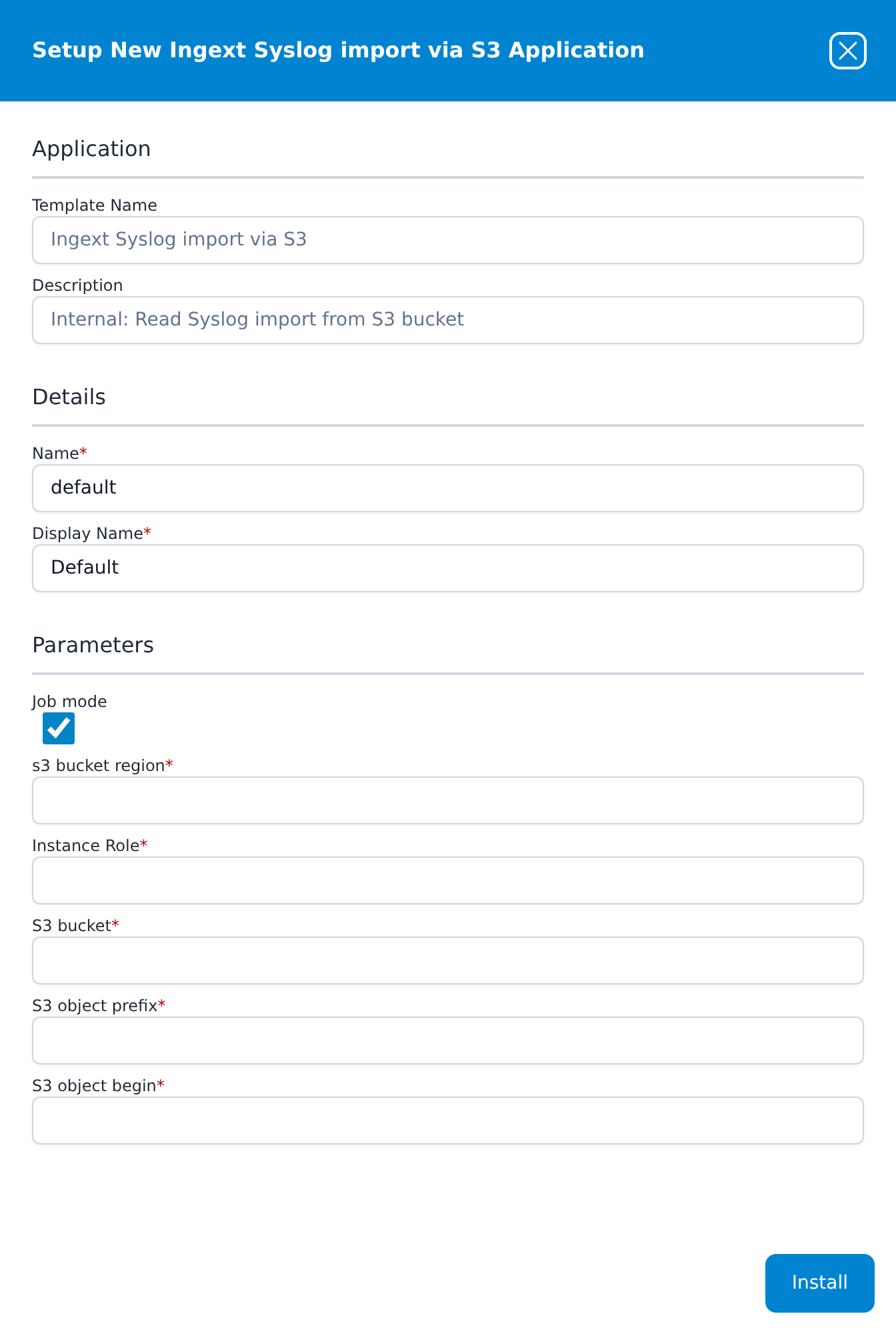
All three take the same core parameters:
| Parameter | Notes |
|---|---|
| Job mode | Ticked by default. Leave it ticked. |
| s3 bucket region | The bucket's region code, such as us-east-1. Free text — there is no drop-down. |
| Instance Role | Despite the label, not an EC2 instance role: the name of a role registered on Settings → Advanced → AWS Roles, the same kind of entry the other AWS templates call Pre-defined AWs Role. The role needs s3:ListBucket on the bucket as well as s3:GetObject on its objects, because a replay lists the bucket — the permissions the notification stack attaches are not enough on their own. |
| S3 bucket | The bucket name. |
| S3 object prefix | The part of the bucket to read. |
| S3 object begin | The key to start after. Objects are read in key-name order, so this sets where the replay starts. It has to begin with the prefix, or the install fails. The legacy-archive template takes S3 object end here instead. |
Related
- Connecting to AWS — the role, External ID, and the CloudFormation templates.
- AWS S3 with SQS Notifications — the queue and notification in detail, including the manual setup.
- Event Streams — the other cloud-native transport, for sources that stream rather than write files.