Webhooks
A webhook is a vendor posting its own JSON events to a URL you give it, as each event happens. It is a push transport like HEC, but without HEC's common envelope: the vendor decides what a delivery looks like, how it is signed, and what happens when one fails. Those three things are what this page is about.
GitHub via Org Webhook is the template that receives this way — GitHub Audit is the worked example, and the specifics below come from it unless they say otherwise.
How It Works
As with HEC, the platform side comes first, because the URL the vendor needs does not exist until the template is installed.
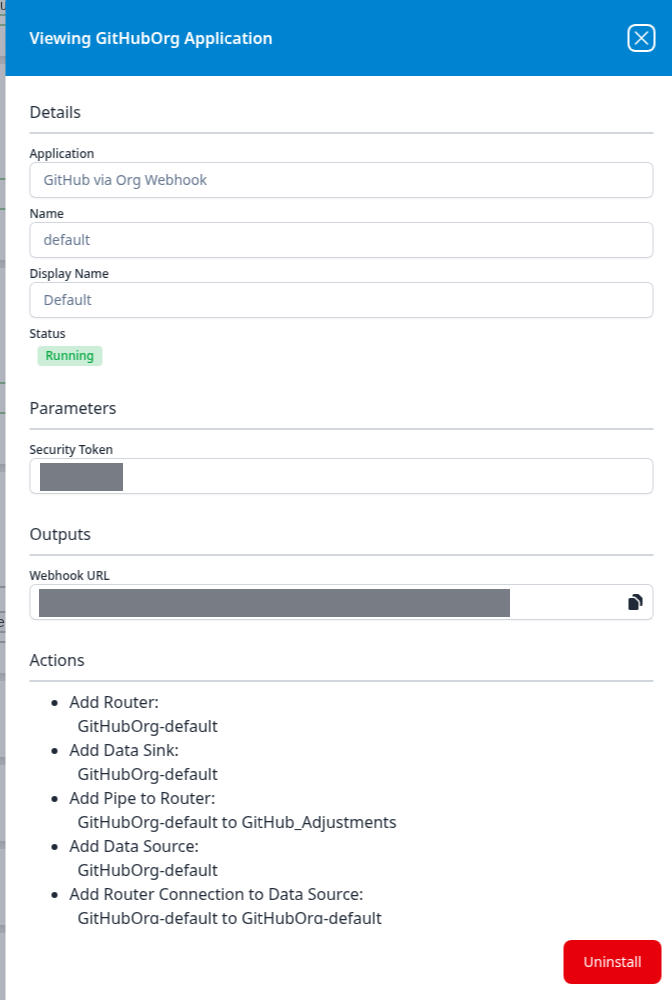
- Install the template with a Security Token — a shared secret you choose, long and random.
- Read the Webhook URL from the installed application's details panel: open it with the blue eye button, and the URL is under Outputs with a copy button at the right of the field.
- Create the webhook in the vendor's console, with that URL as the destination and the same secret as the webhook's own secret. Choose JSON as the content type where the vendor offers a choice.
- The vendor posts each event. The receiver checks the delivery, and hands its body to the application's router and parser.
In the application's pipeline diagram the source is a Webhook node rather than a Plugin Data Source: nothing is polled, and the pipeline only moves when the vendor posts.
How a Delivery Is Authenticated
Two things have to be right, and the receiver checks both:
- The URL. The Webhook URL ends in a random path segment unique to the install. A post to any other path is refused with
401 Invalid token!, which is what a mistyped URL — or one left over from an uninstalled application — produces. - The signature. The vendor uses the shared secret as the key for an HMAC of the request body and sends the result in a header; the secret itself never travels. For GitHub the header is
X-Hub-Signature-256, carryingsha256=and the digest. A delivery without the header is refused with401 Header missing!, a malformed one with401 invalid signature header!, and a digest that does not match — the vendor's secret and the application's Security Token differ — with401 signature mismatch!.
Together the URL and the secret are write access to your data lake. Paste them straight into the vendor's form, not into a ticket or a chat thread on the way.
A successful delivery is answered 200 with the body OK. Vendors give the endpoint a deadline to answer — GitHub allows ten seconds — and record anything slower, or anything other than a 2xx, as a failed delivery.
What the Receiver Does Not Do
The receiver authenticates each delivery as above, and that is all. It does not answer the challenge-response handshakes some vendors require before they will save a webhook — a test request carrying a value the endpoint has to echo back or sign, such as Zoom's endpoint.url_validation. A vendor that insists on one cannot be pointed at a webhook template; the vendor's page says how that product is connected instead.
Delivery Semantics Belong to the Vendor
Unlike polling, where Fluency decides when to ask and how far back, a webhook delivers what the vendor sends when the vendor sends it. Four questions decide how much care the integration needs, and every vendor answers them differently — check each one for your vendor.
| Question | Why it matters | GitHub's answer |
|---|---|---|
| Does the vendor retry a failed delivery? | If not, any time the endpoint was unreachable is a gap that stays a gap until someone acts. | No. One attempt only. |
| How far back can failed deliveries be replayed? | That is how long you have to notice an outage. | 3 days, from the webhook's Recent deliveries list or its API. |
| Does a replay duplicate? | Recovering a partly-delivered window re-sends what did arrive. | Yes — a redelivery re-sends the original payload with the original delivery ID. |
| Is delivery order guaranteed? | Arrival order is not event order. | No. Sort on a timestamp inside the payload, not on @timestamp, which records arrival. |
Subscribe to everything. Vendors' webhook documentation is written for applications that react to events, and so advises subscribing only to the events you need. A log collector is the opposite case: a subscription is not retroactive, so an event type left out today is simply never recorded, and a wildcard subscription picks up event types the vendor adds later where a hand-picked list does not.
Confirming It Works
A Running badge means the endpoint is listening. Until the vendor's side is configured, an empty index is the expected state and proves nothing. The authoritative record is the vendor's:
- The vendor's delivery log. Most vendors list recent deliveries with the response each one got. A
2xxon each means the link is live; a401means the URL or the secret is wrong (the response body says which, as above). - The vendor's test event. GitHub sends a
pingthe moment a webhook is created, and it lands in the index like any other event. - Then the platform side — see Confirm Data Is Arriving.
Rotating the Secret
The Security Token is a parameter, so it is read-only once installed, and the Webhook URL is generated once per install. Changing either means a new install — which issues a new URL — so do it with an overlap rather than an uninstall-and-reinstall, or every event in between is posted to an endpoint that no longer exists:
- Install the template again under a different Name, with the new secret. GitHub's template has no index parameter, so the second install does not collide with the first.
- In the vendor's console, edit the existing webhook in place: new URL, new secret. Editing keeps the webhook's delivery history.
- Confirm a delivery succeeds against the new endpoint.
- Uninstall the original application.
Removing a Webhook
Delete or deactivate the webhook in the vendor's console first, then uninstall the application. The other way round leaves the vendor posting into 401s — and on a vendor that never retries, nothing will tell you.
Network Requirements
The vendor must be able to reach your instance's host name over public HTTPS on port 443. If an inbound filter sits in front of the instance, the vendor has to be allowed through it; vendors that deliver from fixed ranges publish them — GitHub lists its hooks ranges at https://api.github.com/meta.
Related
- HEC (Splunk-compatible) — the other push transport, for products that speak the Splunk protocol.
- GitHub Audit — the reference webhook guide, including a procedure for recovering a gap from GitHub's delivery log.
- Installed Applications → With outputs — where the Webhook URL is shown.