Customer Reports
Customer reports are finished documents built from one tenant's own data and written for a reader outside the SOC: a CISO, a board, an auditor, or the team that owns a product. Each one opens with a rating or a headline, then lays out the evidence behind it and what to fix first. They range from board reports, such as Ransomware Readiness and Cyber Risk in Dollars, through compliance evidence mapped to NIST SP 800-53 and other frameworks, to identity, endpoint, backup, network, cloud, server and platform reports.
Your Fluency contact produces any of them for your tenant on request. Each is also a report skill that an analyst can run with an AI assistant connected to the tenant. This page covers what the reports need from the tenant, then each report: what it shows, what it is built from, and the console dashboard that shows the same data, where there is one.
What a customer report is
- Formats. Every report is a self-contained HTML page and a PDF rendered from it, in the Fluency report style. Most also produce a CSV of their rows. Several resource and activity reports add an interactive explorer: one HTML file with tabs, search, sort, filters, CSV export of the filtered view, and a dark mode.
- Shape. A rating or headline (Green, Amber or Red; a readiness or risk level; an evidence-coverage figure), then the evidence, then the findings ranked with what to do about each.
- Honest about missing data. A section with no data source says so: not assessed, not observed, gap, partial or not available. A report never shows a clean result in place of data it does not have.
- Read-only. Building a report changes nothing on the tenant.
Getting a report
Ask your Fluency contact for the report, naming the tenant and, for a report over a period, the month or range.
Each report is also a report skill, listed in the REPORTS group of Configuration → Skills. An analyst downloads it there (Download skill) and installs it in an AI client, such as Claude, connected to the tenant through the MCP Server, then asks for the report by name. Every report skill takes its styling from the fluency-report skill, in the SKILLS group of the same page, so install that one too; a skill that builds on another report's result names it as a prerequisite in its description. Each report below gives its skill's name.
What the reports need
Daily archive
Most activity and resource reports read the daily archive of a scheduled report and never search live. That scheduled report is an FPL report with Daily archive turned on (Report Scheduler) and a daily schedule: each scheduled run covers the previous day and adds it to the archive, where it is kept for 12 months and listed on Archived Reports. Each report below names its scheduled report; if that report is not set up on your tenant, ask your Fluency contact.
Days are added only by the daily scheduled run. With the schedule off, or on another interval, the archive keeps its days but adds no new ones (see Archiving Daily Results). Missing days can be filled with a backfill, with one limit: an inventory (devices, users, hosts) has no history, so a backfilled day records the inventory as it is on the day of the backfill. Event counts backfill correctly for their day.
Gaps, not zeros
A day the scheduled report did not archive is a gap. The report names the missing days and leaves them out of its counts; it never counts them as zero. A data source the tenant does not have (no CloudTrail table, for example) is reported as not available, which is also not a zero.
Compliance Evidence Report first
The NIST SP 800-53 Control Analysis and the framework views read the result of the Compliance Evidence Report for the same tenant and month, and collect nothing themselves. The Monthly SOC Report reads it too, together with Installed Applications Health. Without those results, the sections that depend on them show a gap.
Periods
| Report kind | Period |
|---|---|
| Monthly SOC Report, Compliance Evidence Report and its views | One calendar month, the last full month by default. |
| Activity reports (Microsoft 365 and Entra, FortiGate, Windows Server, AWS CloudTrail, Acronis) | One calendar month by default, or another range of archived days. |
| Inventory reports (Microsoft 365 Resource Inventory, Defender, CrowdStrike, SentinelOne, Google Workspace, GuardDuty) | The state as of the latest archived day in the period, never a sum of days. Alerts, detections and findings add up across the archived days. If the last day of the period is missing, the report says which day it is as of. |
| Reports from resource dumps (Microsoft 365 Identity Hygiene, Security Agent Deployment Status, Endpoint OS Currency) | The current snapshot. |
| Board reports | Each states its own evidence window, such as the last 30 days of archives (Ransomware Readiness), the last 60 days (Privileged Access Drift) or 90 days of cases (Regulatory Disclosure Readiness). |
Board and executive reports
Reports for a CISO, a board or a CFO. Each opens with a rating or a headline figure and a short thesis, then the evidence behind it. Apart from the Monthly SOC Report, they give counts rather than names: no individual user, host or address appears.
Monthly SOC Report
An eight-chapter story of the month for leadership: an executive summary with a Green, Amber or Red rating and its trend, what happened, patterns, coverage, risk, defences (with a NIST SP 800-53 section), next steps and improvements. It follows the month's cases from the events written to the datalake to the tickets flagged, the ones the AI assistant worked, those closed and those escalated to an analyst, with response and close times, repeat actors, a risk register and a dated remediation list. Anything the data cannot supply, such as the SOC escalation log or ATT&CK mappings, is marked as a gap or partial, never filled in.
Built from: the month's cases (behavior summaries scored 3,000 or more), Installed Applications Health and the Compliance Evidence Report · Skill: ciso-monthly-report
Cyber Risk in Dollars
Financial risk for the board and CFO: expected annual loss, the 1-in-10 and 1-in-20 year loss, a loss exceedance curve, a quantified risk register, and the dollar value of each recommended action. The scenarios are ransomware, business email compromise and a credential-driven cloud data breach, plus accidental and insider data exposure (shadow AI included) when the archived DLP_Activity_Report shows DLP matches. The figures are modelled ranges from a simulation calibrated on the tenant's evidence, not forecasts. With your annual revenue or daily downtime cost, insurance limit and deductible, loss tolerance and the cost of each action, the report uses them; without them it scales from a reference organization and says so, and shows cost to be supplied for each action.
Built from: the Ransomware Readiness evidence, including the archived Office365_Entra_Activity_Report sign-in data, and the DLP_Activity_Report archive when present · Skill: cyber-risk-in-dollars-report (needs ransomware-readiness-report)
Ransomware Readiness
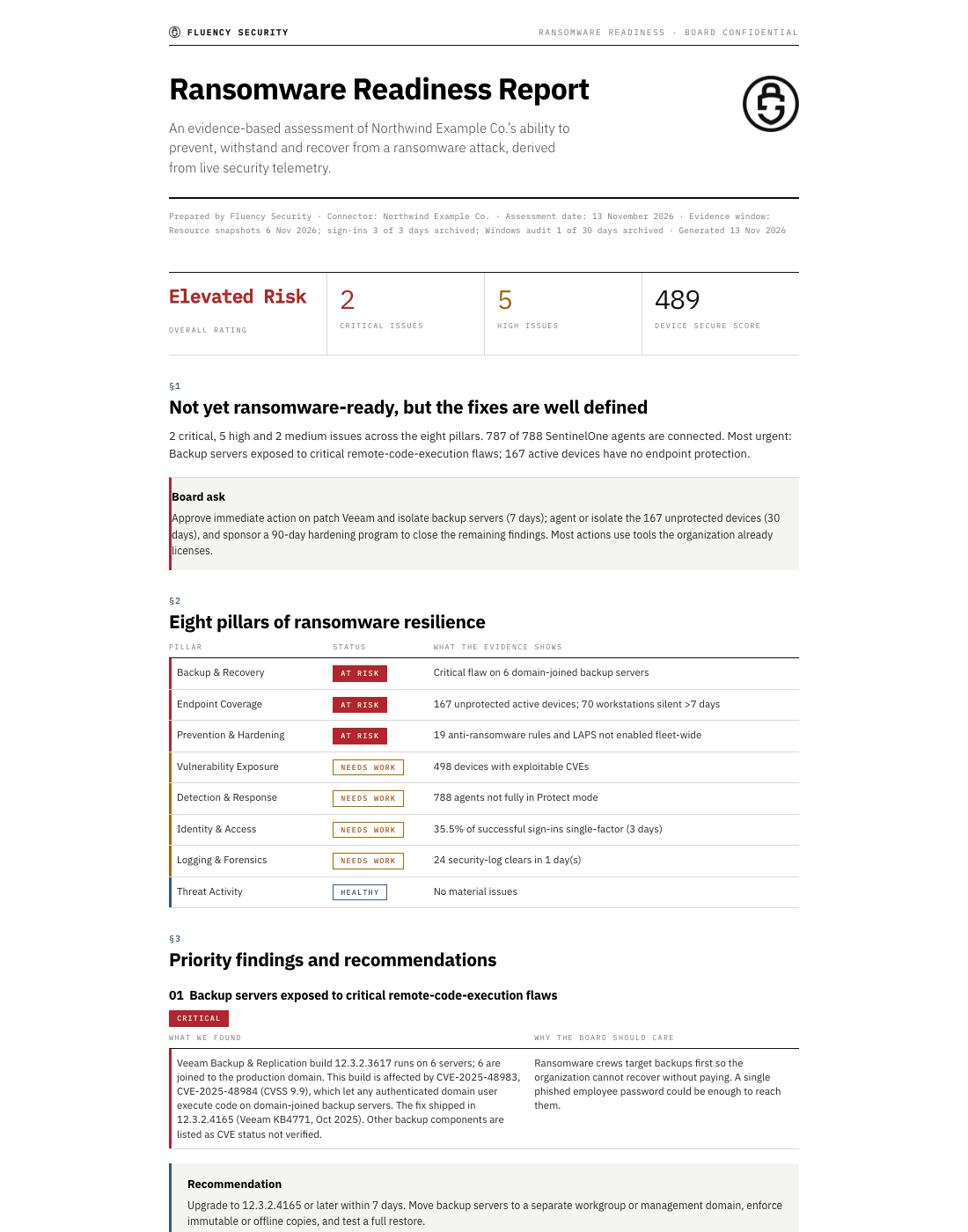
Whether the organization could prevent, withstand and recover from ransomware: an overall rating (Resilient, Moderate Risk, Elevated Risk or High Risk), a scorecard of eight pillars (backup and recovery, endpoint coverage, prevention and hardening, vulnerability exposure, detection and response, identity and access, logging and forensics, threat activity), six to ten ranked issues each with an owner, a target date and its MITRE ATT&CK technique, a 90-day roadmap and the strengths to keep. It checks backup server exposure, EDR coverage and unprotected devices, hardening, exploitable vulnerabilities, detect-only EDR policy, administrator MFA, log clearing and remote-access tools. A pillar with no data source is amber, not measurable, visibility gap.
Built from: resource dumps from SentinelOne, CrowdStrike, Microsoft Defender for Endpoint and Entra ID, and 30 days of the WindowsSrv_Activity_Report and Office365_Entra_Activity_Report archives · Skill: ransomware-readiness-report
Regulatory Disclosure Readiness
Whether the organization could detect, assess and report a significant incident inside the SEC Form 8-K Item 1.05, NIS2 Article 23, DORA Article 19 and customer or privacy-notice deadlines: overall readiness (Ready, Partially ready or Not ready), a clock test, eight disclosure capabilities, the open-case register, findings, a control map and proposed detections. Which regimes apply is asked once; unanswered, SEC and NIS2 show Confirm and DORA Not applicable. It is a planning summary, not legal advice.
Built from: 90 days of the case register (cases scored 3,000 or more), the log sources the tenant has, and log clearing from the WindowsSrv_Activity_Report archive · Skill: regulatory-disclosure-readiness-report
Shadow AI Assessment
The organization's exposure to unsanctioned generative AI: a posture (Low, Moderate, Elevated or High) across five evidence paths, the AI services found, key findings, actions by horizon and proposed detections. A path with no data source is reported as not assessed, never as clean.
Built from: Entra applications and user grants, the endpoint software inventory (local LLM runners, AI desktop apps), EventWatch rule coverage, and the DLP_Activity_Report archive when present · Skill: shadow-ai-assessment-report
Privileged Access Drift
How administrator, directory-role and application privileges changed over the last 60 days: a drift rating, a dated timeline, findings, the applications granted high-tier Microsoft Graph permissions, the role inventory, strengths, coverage gaps and proposed detections. It names applications and shared accounts, never individual administrators.
Built from: the Office365_Resource_Inventory_Report and Privileged_Access_Drift_Report archives, with the Office365_Entra_Activity_Report and WindowsSrv_Activity_Report archives when present · Skill: privileged-access-drift-report
The role-holder history starts on the first archived day of Office365_Resource_Inventory_Report, which cannot be backfilled.
Compliance evidence
Evidence reports, not certifications. None of them states that the organization is compliant, certified or attested: they show what the tenant's telemetry supports, what is partial, and what was not observed, which is not a failed control.
Compliance Evidence Report
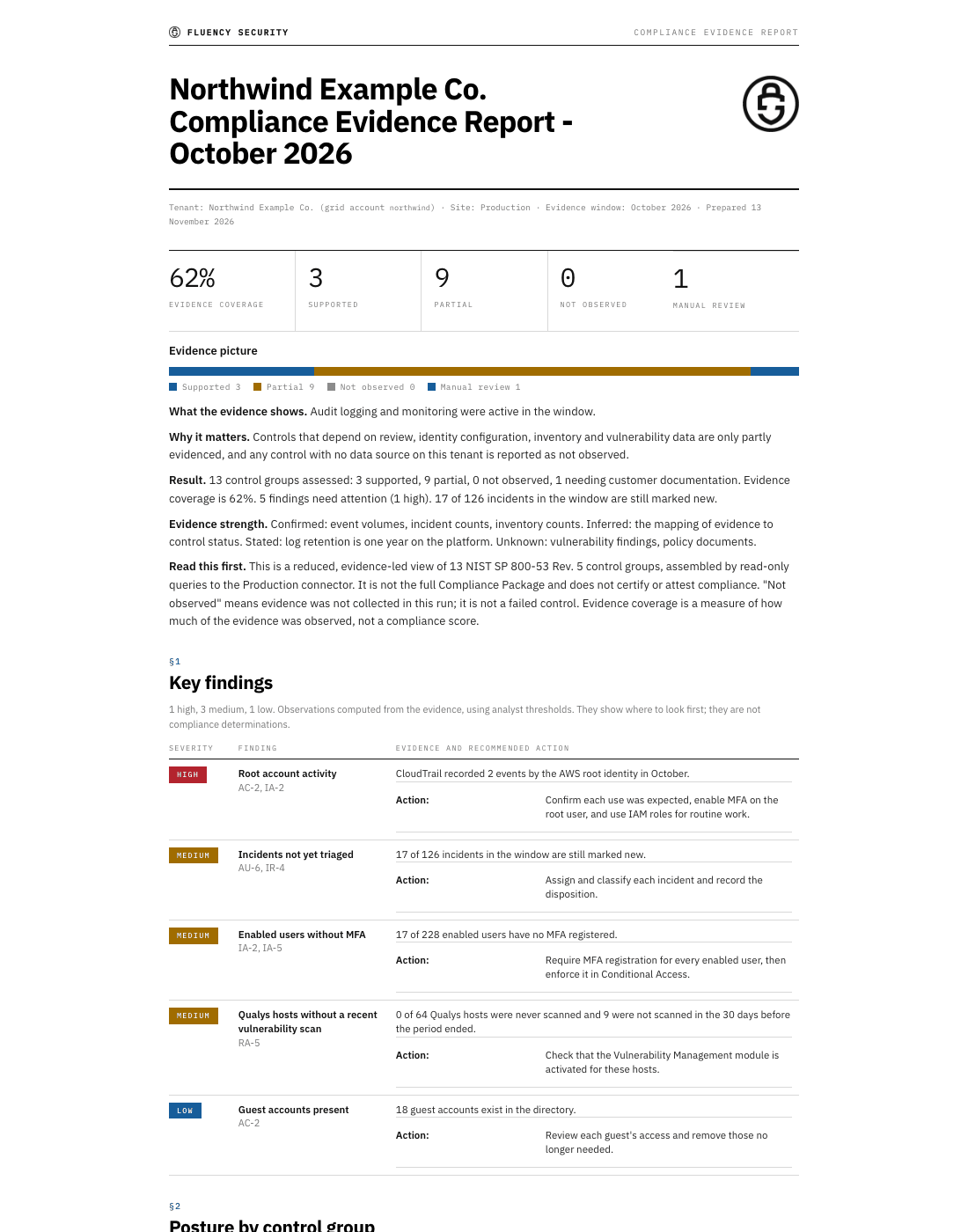
A month of evidence mapped onto NIST SP 800-53 Rev. 5 control groups, each one supported, partial, not observed or needing manual review (policies and procedures, which only customer documents can evidence). It adds key findings with recommended actions, an evidence-coverage figure (a supported group counts 1, a partial one 0.5) and a month-over-month trend. Log retention is reported as supported, with the platform's one-year retention.
Built from: Windows audit events and the tenant's network, endpoint, cloud and identity tables; Office 365, Entra and CloudTrail counts from the Office365_Entra_Activity_Report and CloudTrail_Activity_Report archives (never searched); the month's cases; resource dumps (Microsoft 365 users, devices and Conditional Access policies, and Qualys, Tenable, Defender, SentinelOne, CrowdStrike, GuardDuty and Google Workspace where present); and the tenant's applications and reports · Dashboard: Compliance Evidence Report · Skill: compliance-assessment
A tenant with Office 365, Entra or CloudTrail data needs that archive to hold days of the month; the report does not search those tables instead.
NIST SP 800-53 Control Analysis
The same evidence control by control: control, title, status, evidence state, what the evidence showed, and the next evidence worth collecting. An optional view renders it as NIST CSF 2.0 and SP 800-171 Rev. 3 categories, keeping the 800-53 control as the lineage.
Built from: the Compliance Evidence Report result · Dashboard: the Controls tab of the Compliance Evidence Report, with its Next evidence column, and NIST CSF 2.0 in its framework drop-down · Skill: nist-compliance-analysis
Framework views
Each view expresses the Compliance Evidence Report's result in one framework's terms: every requirement with its related 800-53 control groups and their status, a caveat, the strongest mapped areas, the areas not observed, the evidence still needed, and a table of framework-specific checks such as MFA, logging, incidents and threat findings. The views other than ISO 27001 and CMMC also open with an evidence-coverage figure and its change since the prior month, and list what telemetry cannot evidence. Rows are related to the 800-53 evidence, never equivalent to it.
| View | Framework | Skill |
|---|---|---|
| CIS Controls v8.1 View | CIS Critical Security Controls v8.1 | cis-compliance-analysis |
| FedRAMP View | FedRAMP (NIST SP 800-53 Rev. 5 baselines) | fedramp-compliance-analysis |
| GDPR View | GDPR (Regulation (EU) 2016/679) | gdpr-compliance-analysis |
| HIPAA Security Rule View | HIPAA Security Rule | hipaa-compliance-analysis |
| ISO 27001 and CMMC View | ISO/IEC 27001:2022 Annex A and CMMC 2.0 Level 2, side by side | iso-cmmc-compliance-analysis |
| PCI DSS v4.0.1 View | PCI DSS v4.0.1 | pci-dss-compliance-analysis |
| SOC 2 View | SOC 2 Trust Services Criteria | soc2-compliance-analysis |
Built from: the Compliance Evidence Report result · Dashboard: the Compliance framework drop-down of the Compliance Evidence Report, which shows the same evidence as an indicative crosswalk for each of these frameworks (ISO 27001 and CMMC as separate entries)
Identity and Microsoft 365
Who has access, how they sign in, and what they do.
Microsoft 365 Identity Hygiene
A rating, a scorecard and the top finding, then the detail: administrators judged against a headcount baseline (flagged when they also have a second weakness), weak MFA, OAuth consent, stale token baselines, password policy set to None, real headcount and unlicensed accounts, Windows end-of-life, application registrations and device registrations, and a remediation sequence.
Built from: the Microsoft 365 resource dumps (users, applications, devices) · Dashboard: Microsoft 365 Hygiene Report · Skill: office365-posture-review
Microsoft 365 Resource Inventory
The directory as of the latest archived day: accounts, administrators and MFA registration (naming the enabled users with no MFA registered), devices, Conditional Access policies by state, application registrations with their client-secret hygiene and app-only permissions, enterprise applications, groups, and licensed users per license. MFA registration is not MFA enforcement, and the report says so. Also as an interactive explorer.
Built from: the Office365_Resource_Inventory_Report archive · Dashboard: Microsoft 365 Resource Inventory · Skill: microsoft365-resource-inventory-report
Microsoft 365 and Entra Activity
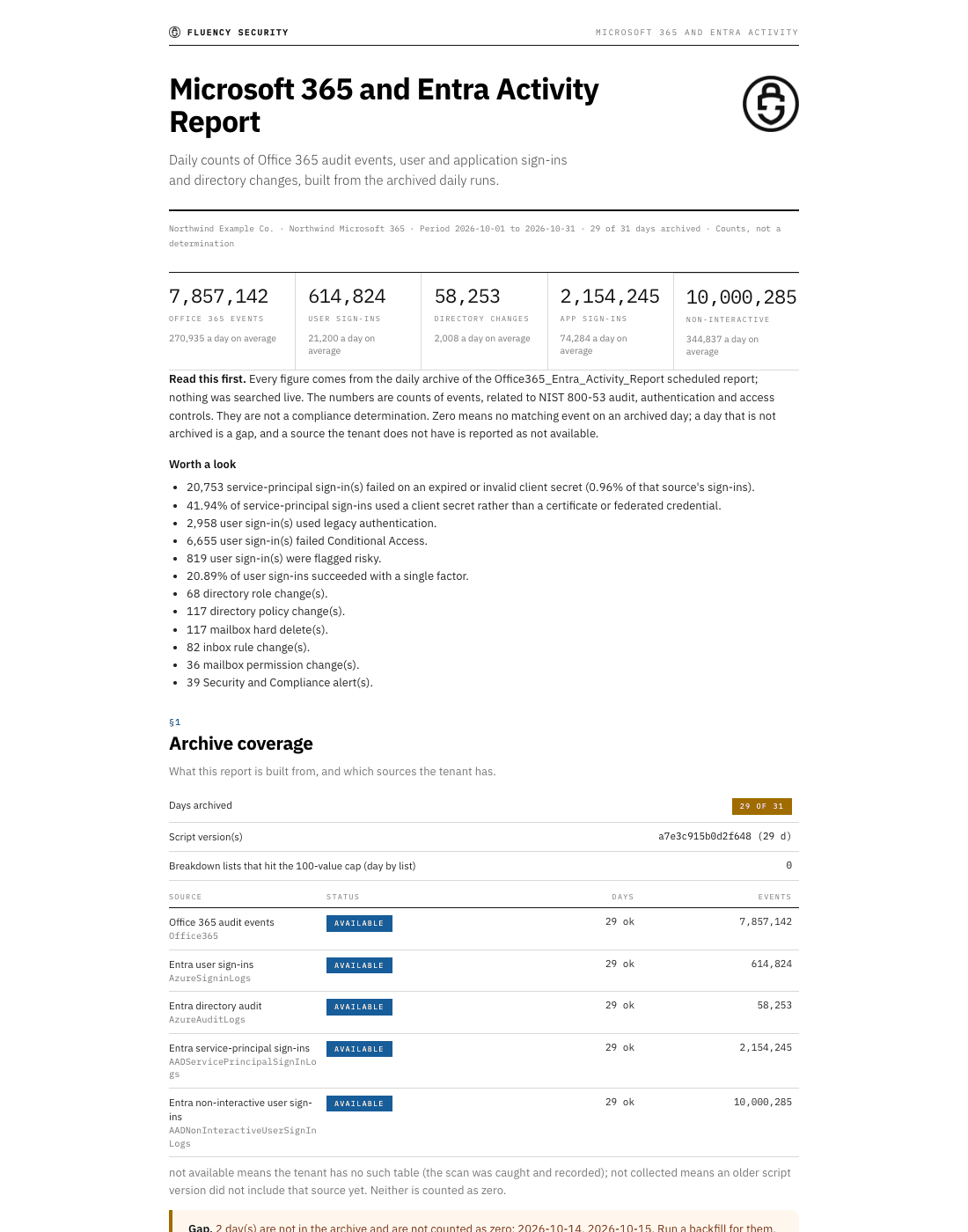
Office 365 audit events, Entra user sign-ins, directory-audit changes, and service-principal and non-interactive sign-ins over the period, with breakdowns, a worth a look list of figures that stand out, the archive coverage and any source the tenant does not have. Also as an interactive explorer.
Built from: the Office365_Entra_Activity_Report archive · Dashboard: Microsoft 365 and Entra Activity Report · Skill: microsoft365-entra-activity-report
Office 365 Activity
A whole-account report of Office 365 activity over a time window (the last 24 hours by default), with a timechart by workload and ranked tables, in one of three focuses: every workload, Exchange mailbox activity, or who accessed which mailboxes (owner or not, and from where). Unlike the archive-backed reports, it searches the datalake directly.
Built from: the Office365 datalake table · Dashboard: the Exchange activity and MailItemsAccessed views of the Microsoft 365 and Entra Activity Report, which search the same table live · Skill: o365-activity-report
Google Workspace Users and Activity
Every user scored Needs action, Watch or Healthy, with 2-Step Verification enrolment and the gap among administrators, stale and never-signed-in accounts, org units, groups, and the sign-ins, suspicious logins, admin changes and app authorizations of the archived days. Also as an interactive explorer.
Built from: the GoogleWorkspace_Resource_Report archive · Dashboard: Google Workspace Resource Report · Skill: googleworkspace-resource-report
Endpoint and backup
Which devices are protected, current and reporting.
Security Agent Deployment Status
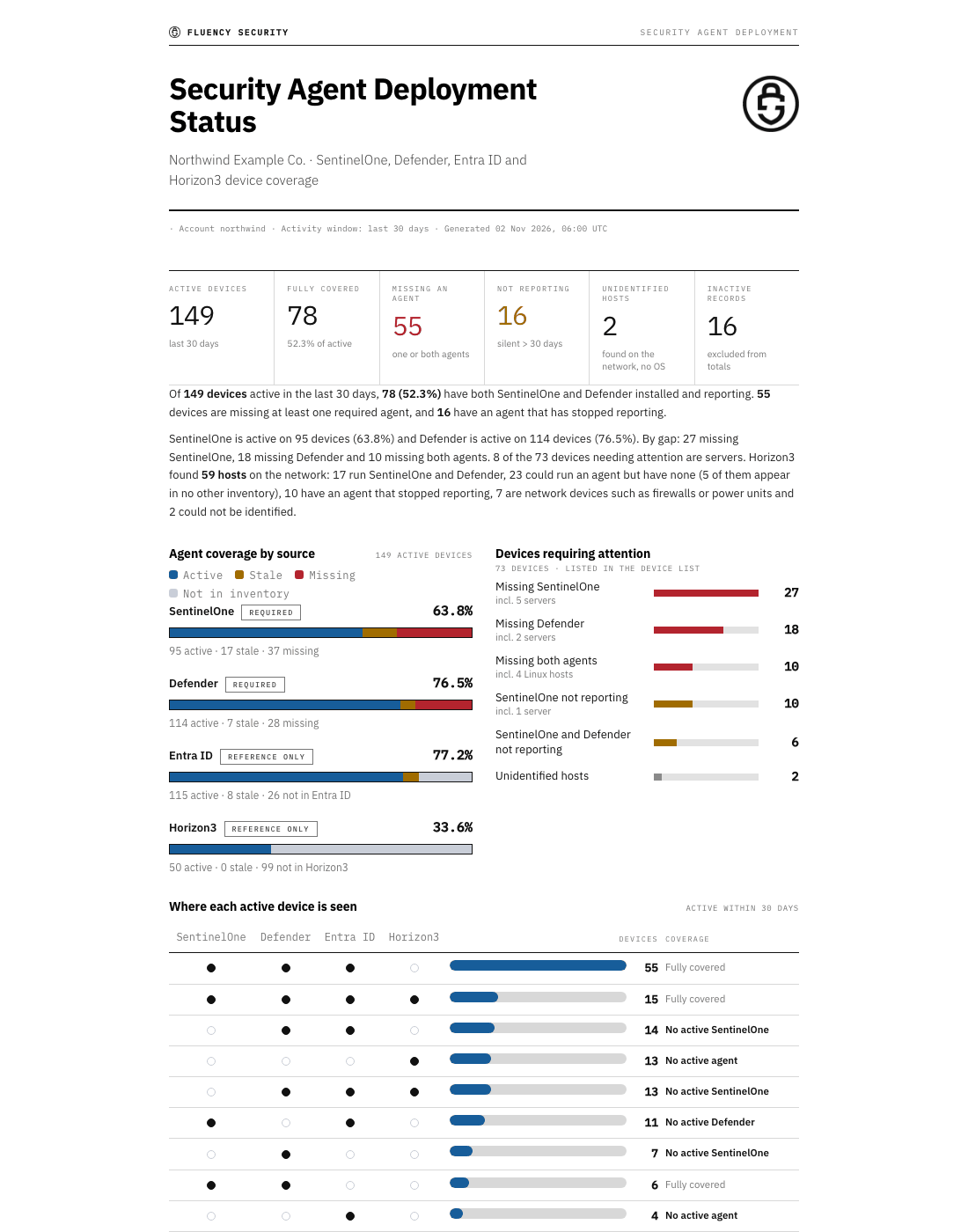
Per-device coverage across the endpoint agent inventories: devices missing an agent, agents that stopped reporting, unidentified hosts, and hosts that Horizon3.ai NodeZero pentests found on the network, with next steps and a device CSV. It runs with the inventories the tenant has and names any that are missing. Other inventories, such as CrowdStrike or Intune, can be added to the comparison.
Built from: resource dumps (by default SentinelOne, Microsoft Defender for Endpoint and Entra ID, plus Horizon3.ai) · Skill: security-agent-deployment-status-report
Endpoint OS Currency
Which operating systems are running, which hosts are on an unsupported Windows release or about to be, and which run an older build than the rest of the fleet, with a per-host CSV.
Built from: one resource dump: CrowdStrike Falcon hosts, else SentinelOne agents, else Entra devices · Skill: endpoint-os-currency
Microsoft Defender for Endpoint
Enrolment coverage, device health and last seen, antivirus health, vulnerabilities and exploitable CVEs, secure configuration, recommendations, and the alerts and incidents raised in the period, ranking the devices that need action first. Also as an interactive explorer.
Built from: the Defender_Resource_Report archive · Dashboard: Microsoft Defender Resource Report · Skill: defender-resource-report
CrowdStrike Falcon
Host check-in health, sensor versions, protection gaps, policy coverage and the endpoint detections raised in the period, ranking the hosts that need action first. Also as an interactive explorer.
Built from: the CrowdStrike_Resource_Report archive · Dashboard: CrowdStrike Falcon Resource Report · Skill: falcon-resource-report
SentinelOne
Agents (reporting status, versions, protection mode), applications (risk levels, the most widespread) and threats (history, open threats, trend), ranking the endpoints that need action first, with a table of how the console changed over the other archived days. Also as an interactive explorer.
Built from: the SentinelOne_Resource_Report archive · Dashboard: SentinelOne Resource Report · Skill: sentinelone-resource-report
Acronis Cyber Protect Data Review
Open EDR cases, agents with stale protection definitions or no Active Protection, agent hygiene (stale and duplicate records, installer versions, failed updates), backup results and alert quality. Also as an interactive explorer.
Built from: the Acronis_Protection_Report archive · Dashboard: Acronis Protection Report on Reports · Skill: acronis-protection-report
Network, cloud and server activity
What happened on the firewalls, in AWS and on the servers.
FortiGate Security Activity
Failed SSL-VPN logins by device, country, source address and user, SSL-VPN sessions, IPsec tunnels, application-control and web-filter blocks, IPS and DoS anomalies, and administrator logins and configuration changes.
Built from: the Fortigate_Security_Activity_Report archive · Dashboard: FortiGate Security Activity Report · Skill: fortigate-security-activity-report
FortiGate Traffic Activity
Traffic volume (events, blocks, bytes), applications, categories, services, destination countries, policies, devices, the top internal senders, and a summary of generative-AI traffic. Also as an interactive explorer.
Built from: the Fortigate_Traffic_Activity_Report archive · Dashboard: FortiGate Traffic Activity Report · Skill: fortigate-traffic-activity-report
Windows Server Activity
Event ingestion by host and event ID, logons and failures, failed-logon sources, privileged logons, account and group changes, services and scheduled tasks installed, audit-log clears and policy changes. Also as an interactive explorer.
Built from: the WindowsSrv_Activity_Report archive · Dashboard: Windows Server Activity Report · Skill: windows-server-activity-report
AWS CloudTrail Activity
Events, errors, access denied, console logins and MFA, IAM changes, root-identity events and CloudTrail changes, with breakdowns by service, region, identity type and error code.
Built from: the CloudTrail_Activity_Report archive · Dashboard: AWS CloudTrail Activity Report on Reports · Skill: aws-cloudtrail-activity-report
AWS GuardDuty Findings
Each finding counted once, on the day it was created, and ranked by severity and recency, with finding types and categories, AWS accounts and regions, the resources affected, the findings GuardDuty keeps re-sending, and the daily counts. Also as an interactive explorer.
Built from: the GuardDuty_Resource_Report archive · Dashboard: AWS GuardDuty Resource Report · Skill: guardduty-resource-report
Platform
Installed Applications Health
Every installed application instance as Running, Error, Attention, Disabled or Other, by the same status logic as the Applications page, with its last-24-hour traffic, last-active time and, where the connector provides them, error bytes by component, plus a per-application CSV.
Built from: the tenant's application configuration (credentials removed) · Skill: health-status-report
What the reports do not cover
- Certification. The compliance reports are evidence, not certification or attestation. They state what telemetry cannot evidence, and policies and procedures need the customer's own documents.
- Recovery. Ransomware Readiness cannot prove that the organization could recover: backup job success, backup age, immutability and restore tests are not in any data source. The backup products and versions installed on endpoints are its only backup signal.
- Accidental and insider exposure without DLP. Cyber Risk in Dollars models accidental and insider data exposure only when the archived
DLP_Activity_Reportshows matches; with none, that scenario is left out, because zero matches cannot tell "no DLP policy" from "no sensitive data moved". Its losses are gross: insurance recoveries and deductibles are not netted off. - Legal determinations. Regulatory Disclosure Readiness is a planning summary, not legal advice. Whether a regime applies is a question for counsel, and a reportability decision that the cases do not record shows as not evidenced.
- Network traffic to AI services. Shadow AI Assessment reports its network egress path as not assessed: no archived report carries proxy, DNS or firewall traffic to AI services for it.
- Individual dormant administrators and PIM-eligible roles. Privileged Access Drift counts the administrators who signed in on a day, not which ones, and counts active role holders only.
- Long lists. Google Workspace Users and Activity lists up to 200 users (those needing attention first) and the 100 largest groups; its counts cover every user.
- Past inventory states. A backfilled day of an inventory archive holds the inventory as it is on the day of the backfill (see Daily archive).
Related
- Reports: the console dashboards, several of which show the same archived data interactively
- Report Scheduler: turning on a scheduled report's daily archive
- Archived Reports: which days each archive holds, and backfilling the missing ones
- Skills: the report skills, with their descriptions and downloads
- MCP Server: connecting an AI client to the tenant
- Scheduling and Delivery: putting a report on a schedule