Entra ID Audit via Event Hubs
An Azure event hub is the pipe Microsoft provides for handing logs to a SIEM. Microsoft Entra ID and Azure Monitor do not wait to be asked: a diagnostic setting pushes each record into an event hub as it is written, and Fluency reads the hub with a connection string that can do nothing but listen.
| Template | Collects | Written into the hub by | Steps |
|---|---|---|---|
| Azure Directory Audit (Event Hub) | Microsoft Entra ID activity logs — the directory audit, sign-ins and provisioning | A Microsoft Entra diagnostic setting | This page |
| Azure Event Hubs | Any other Azure log: the subscription Activity Log, and resource logs from Key Vault, Azure Firewall, SQL, Storage and the rest | Azure Monitor diagnostic settings | Azure Event Hubs |
Azure Directory Audit (Event Hub) is how Fluency collects the Entra ID audit log. It replaces Azure Directory Audit, which polls Microsoft Graph and is now a legacy template. Compared with the Event Hub route, on that page, sets the two side by side.
The setup has three parts, and they often belong to three different people:
- In Azure — someone with Contributor on an Azure subscription creates an Event Hubs namespace, an event hub, and a Listen-only policy on that hub. This produces one value, the policy's Primary connection string.
- In Microsoft Entra ID — a Security Administrator adds a diagnostic setting that streams the Entra logs into the hub.
- In Fluency — install the Azure Directory Audit (Event Hub) template with the connection string.
Nothing is granted to Fluency inside your directory: there is no application to consent to and no Microsoft Graph permission. The only credential that leaves Azure is the connection string, and it reaches one event hub and can only read from it.
What arrives
Microsoft Entra ID logs
The diagnostic setting decides which categories go into the hub. The choice is made in Entra ID, not on the install form, and it can be changed later without touching Fluency. The template keeps the first six below and drops the rest — see Where it is filed.
| Category | Contents | Licence |
|---|---|---|
AuditLogs | Directory changes: users, groups, applications, role assignments, licences, password resets, consent grants. The record of what changed in your identity system and who changed it. | Any tier |
SignInLogs | Interactive user sign-ins — a user entering a password or passing an MFA challenge — with client IP, device, application, Conditional Access result and risk. | P1 or P2 |
NonInteractiveUserSignInLogs | Sign-ins a client performs on a user's behalf with a token or code, such as token refreshes. | P1 or P2 |
ServicePrincipalSignInLogs | Applications signing in as themselves with a certificate or client secret. | P1 or P2 |
ManagedIdentitySignInLogs | Managed identities signing in, where Azure holds the secret. | P1 or P2 |
ProvisioningLogs | User and group provisioning to and from connected applications such as Workday or ServiceNow. | P1 or P2 |
RiskyUsers, UserRiskEvents, RiskyServicePrincipals, ServicePrincipalRiskEvents | Microsoft Entra ID Protection's risk state and risk detections. Dropped by this template. | P2 |
MicrosoftGraphActivityLogs | Every HTTP request made to your tenant through Microsoft Graph. Dropped by this template. | P1 or P2 |
The list in your tenant can be longer. ADFSSignInLogs is populated only for AD FS applications, the NetworkAccess…, RemoteNetworkHealthLogs and EnrichedOffice365AuditLogs categories only for Global Secure Access customers, and Microsoft describes MicrosoftServicePrincipalSignInLogs, its first-party service-to-service sign-ins, as "not necessary for most customers as they are complex and generate a high volume of data". Leave that one off.
Microsoft lists audit logs as available on every tier, including Free. For sign-ins, the diagnostic-setting screen itself warns that exporting sign-in data requires a P1 or P2 licence, so on a Free tenant select AuditLogs and expect nothing from the sign-in categories.
Microsoft's own estimate: "the non-interactive user sign-ins and service principal sign-ins can be 5 to 10 times larger than the interactive user sign-ins." They are also where token theft and abused application credentials show up, so they are worth collecting — but size the namespace for them (see Troubleshooting for what throttling looks like), and leave MicrosoftGraphActivityLogs off: it records every Graph call in the tenant, and this template drops it.
The diagnostic-setting records collected here, the Microsoft Graph records the legacy Azure Directory Audit template polls, and the Audit.AzureActiveDirectory content type in the Office 365 unified audit log (Office 365 Activity API) describe overlapping events in different shapes, with different fields and different retention. Running this alongside the unified audit log is duplicate coverage, not duplicate data.
Where it is filed
Each record is kept twice. As Microsoft exported it — the Azure Monitor envelope, with the Entra record under properties — it goes to the index named on the install form, MSEntra by default. That is the index the Default-EntraID_AuditLogs and Default-EntraID_SignIn search facets are set on, and the Entra ID detection rules match the same records; both select them by @eventType, which holds the category. MSEntra is this template's own index: the legacy Azure Directory Audit template and Office365-Audit write their Microsoft Graph records to AzureAudit by default, so the event hub and Graph shapes are not mixed in one index. The sign-in and audit categories are also rewritten into the columns of the matching Log Analytics table, so a query written against Microsoft's table runs unchanged, and each goes to an index of its own:
| Category | MSEntra | Table index |
|---|---|---|
AuditLogs | Yes | AzureAuditLogs |
SignInLogs | Yes | AzureSigninLogs |
NonInteractiveUserSignInLogs | Yes | AADNonInteractiveUserSignInLogs |
ServicePrincipalSignInLogs | Yes | AADServicePrincipalSignInLogs |
ManagedIdentitySignInLogs | Yes | AADManagedIdentitySignInLogs |
ProvisioningLogs | Yes | — |
The table indexes are fixed by the template, not parameters, and they are the same five that the legacy Azure Directory Audit and Office365-Audit templates fill from Microsoft Graph. Every other category is dropped — the ID Protection risk categories, MicrosoftGraphActivityLogs, ADFSSignInLogs and the Global Secure Access categories among them — so selecting one costs namespace throughput and collects nothing. To keep them, send them with a second diagnostic setting to a hub of their own, read by the Azure Event Hubs template.
Retention: the hub's, not Entra's
A diagnostic setting streams records as Entra writes them. It does not send anything older than the setting itself, and it does not re-send a record that has already gone into the hub. So once a record is in the hub, the hub's retention is how long Fluency has to read it:
| Event Hubs tier | Maximum retention | Consumer groups |
|---|---|---|
| Basic | 1 day | $Default only |
| Standard | 7 days | Up to 20 |
That retention is the length of Fluency-side outage the integration survives. Entra keeps its own copy for its own retention period — seven days on Free, 30 on P1 or P2 — but nothing feeds that copy back into the hub. Use Standard and set the hub's retention to the full seven days.
Before you begin
An Azure subscription in the same tenant, and Contributor on it. The namespace and hub are Azure resources, so creating them needs Azure RBAC — Contributor or Owner on the subscription, or Contributor on an existing resource group — rather than an Entra directory role. Microsoft requires that "The subscription and Event Hubs namespace must both be associated with the Microsoft Entra tenant from where you're streaming the logs."
The namespace is billed for as long as it exists, per throughput unit per hour plus ingress, whether or not anything reads it. One Standard throughput unit is the starting point.
A Security Administrator in Microsoft Entra ID, for the diagnostic setting. Microsoft names it "the least privileged role required to configure diagnostic settings". That person also needs to read the keys of a policy on the namespace — Azure Monitor's rule is that "you must have the ListKey permission on that Event Hubs authorization rule" — which is an Azure permission, not an Entra one. Either one person holds both, or the Security Administrator is given Contributor on the namespace for the step.
Compared with the legacy Azure Directory Audit template, no Global Administrator or Privileged Role Administrator is involved, and no Fluency application is added to your tenant.
A P1 or P2 licence for sign-ins and provisioning logs. The directory audit needs neither.
Access to the Fluency portal with permission to install applications.
Part 1 — Azure
Performed in the Azure portal by someone with Contributor on the subscription.
1. Create the namespace
Search for Event Hubs and choose + Create. On the Basics tab:
- Subscription and Resource group — the subscription in your Entra tenant; Create new, under the resource group list, makes a resource group for the integration.
- Namespace name — globally unique; it becomes
<name>.servicebus.windows.net. - Region — any region. Entra ID is a global service, so the region does not have to match anything for Entra logs.
- Pricing tier — Standard. The capture below shows Basic, whose one-day retention and single consumer group are too little for this.
- Throughput Units — 1.
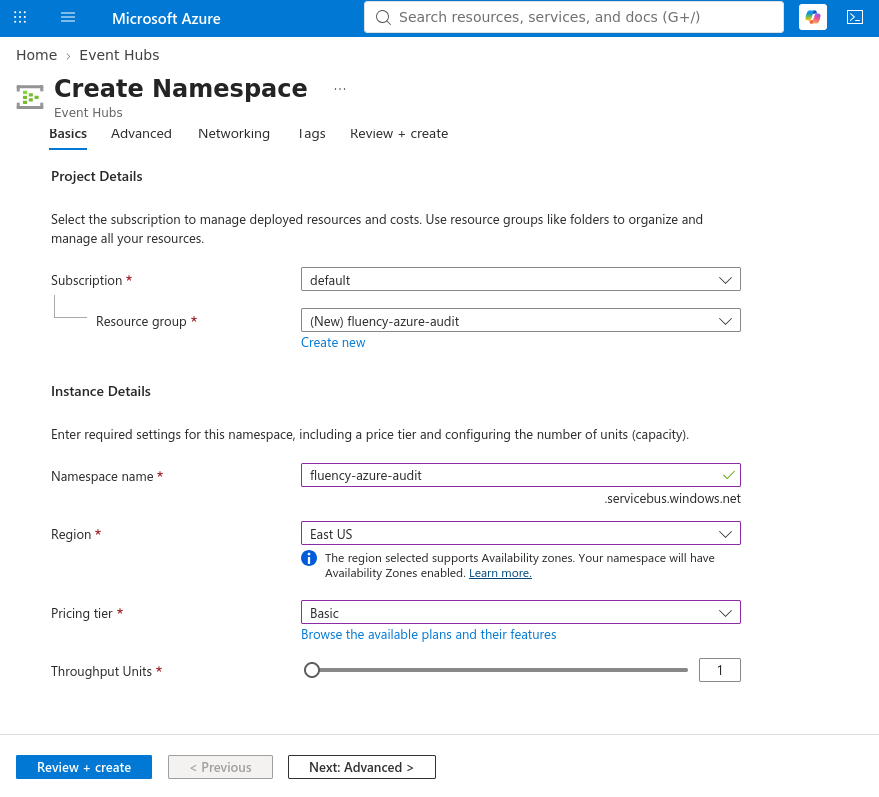
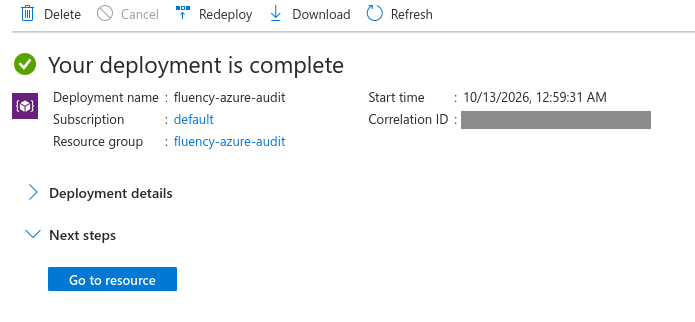
Choose Review + create, then Create once the banner reads Validation succeeded. When the deployment page reads Your deployment is complete, choose Go to resource.
2. Create the event hub
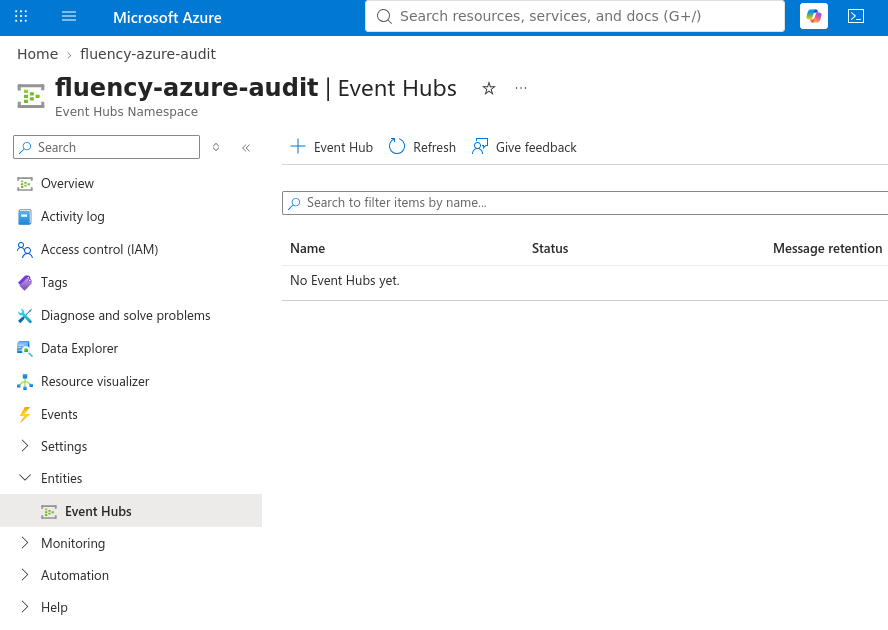
In the namespace, go to Entities → Event Hubs, and choose + Event Hub.
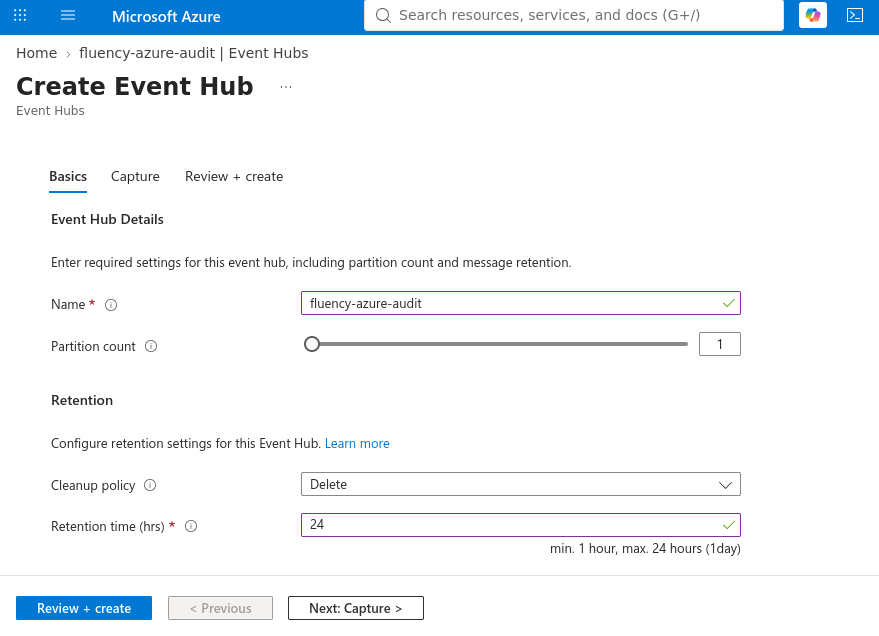
On the Basics tab:
- Name — for example
entra-logs. Give Entra ID a hub of its own; other Azure logs go into a different hub, read by the Azure Event Hubs template. - Partition count — 2 is enough for most tenants. It cannot be changed after creation on Basic or Standard.
- Cleanup policy — Delete, the default.
- Retention time (hrs) — the maximum the tier allows: 168, seven days, on Standard. The allowed range is printed under the field; the capture is from a Basic namespace, where it stops at 24.
Leave the Capture tab as it is, then choose Review + create and Create.
3. Create a Listen-only policy on the event hub
Open the new hub from the Event Hubs list.
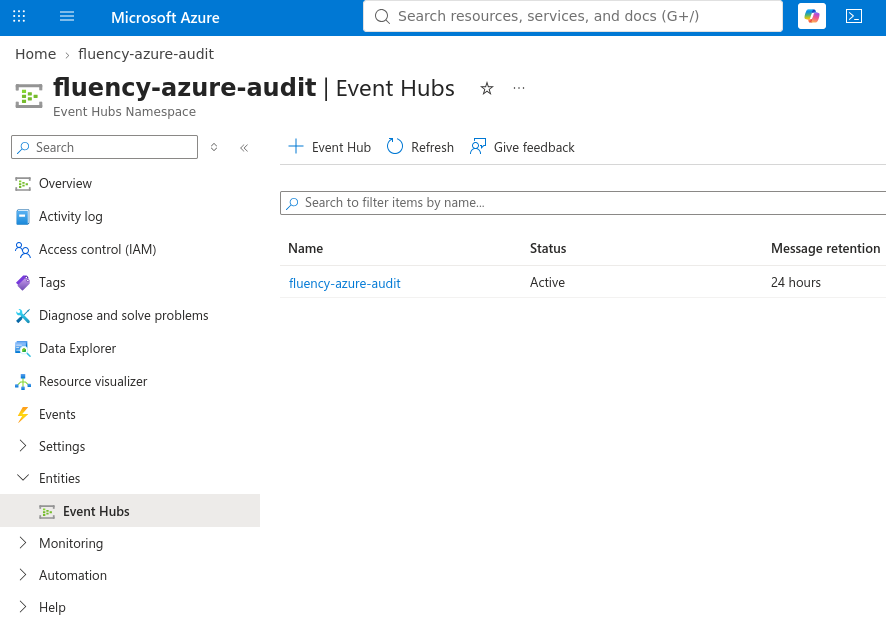
In the hub, go to Settings → Shared access policies and choose + Add.
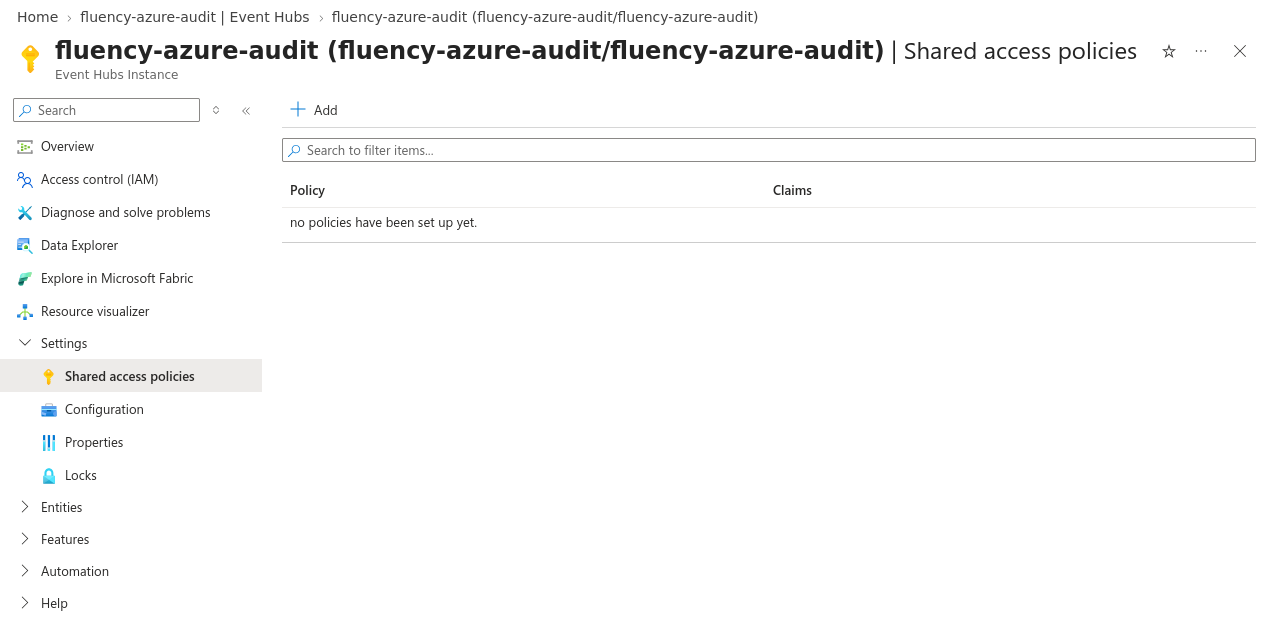
Name the policy — fluency-listen, say — tick Listen and nothing else, and choose Create.
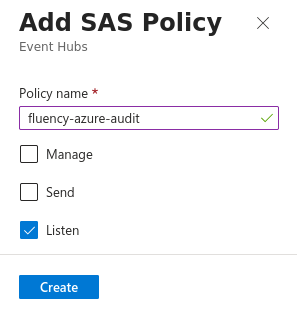
The namespace has a Shared access policies page too, and the two look almost identical. The sub-heading under the page title tells them apart: Event Hubs Instance is the hub, which is where this policy belongs; Event Hubs Namespace is the wrong page. A namespace policy's connection string lacks ;EntityPath=<hub name>, reaches every hub in the namespace, and — if it is the built-in RootManageSharedAccessKey — carries Manage rights over all of them.
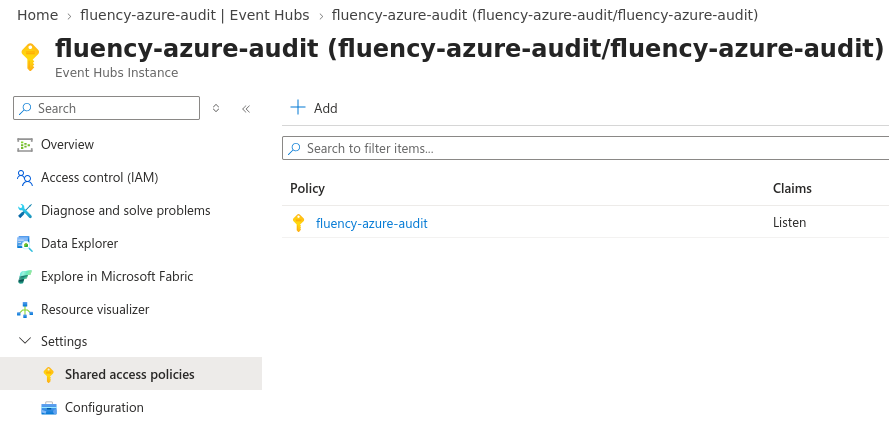
4. Copy the connection string
Select the policy. The SAS Policy panel opens with the policy's claims and five values under them — Primary key, Secondary key, Primary connection string, Secondary connection string and SAS policy ARM ID.
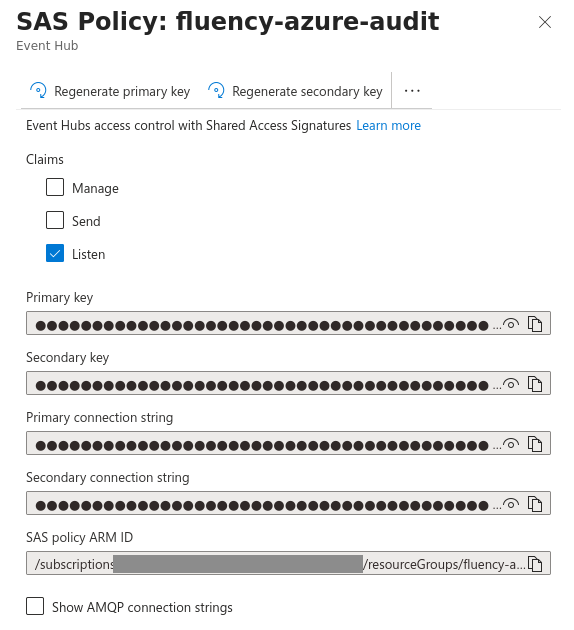
Four of the five are credentials, and only one of them goes into Fluency: the Primary connection string. The two keys are bare secrets, without the namespace, policy name and hub that Fluency also needs, and the Secondary connection string is held back for rotating the key.
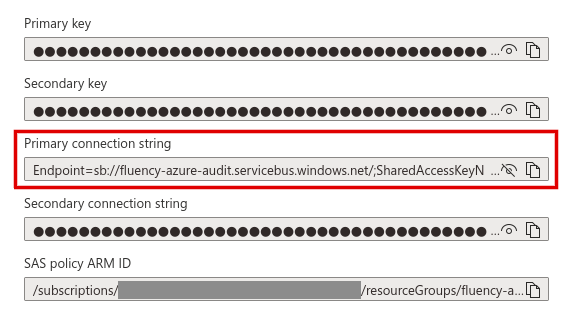
Copy it with the copy button at the end of its field. The field is too narrow to show the whole string, so selecting the visible text gets only the start of it. Leave Show AMQP connection strings unticked.
Fluency takes the connection string as one value, unedited. It is a single line of four name=value pairs separated by semicolons, starting with Endpoint=sb:// and ending with ;EntityPath= and the hub's name:
Endpoint=sb://<namespace>.servicebus.windows.net/;SharedAccessKeyName=<policy name>;SharedAccessKey=<key>;EntityPath=<hub name>
Do not cut it down to the SharedAccessKey value, drop the EntityPath, or add quotes, spaces or line breaks. A string with no ;EntityPath= came from a namespace policy, not the hub's — go back to step 3.
| Value | Where it came from |
|---|---|
| Primary connection string | The Listen policy on the event hub, step 3 |
The string carries the policy's key, so treat it as a credential. Unlike most secrets, though, it is not shown once: it can be read again from Shared access policies at any time, and replaced by regenerating the key.
Automated alternative — Azure CLI
Steps 1 to 4 as Azure CLI commands. Run them signed in to the right subscription (az account show names it), and replace the namespace name with one of your own.
RG=fluency-eventhub-rg
NS=<globally-unique-namespace-name>
HUB=entra-logs

az group create --name "$RG" --location eastus

az eventhubs namespace create --resource-group "$RG" --name "$NS" \
  --location eastus --sku Standard --capacity 1

az eventhubs eventhub create --resource-group "$RG" --namespace-name "$NS" \
  --name "$HUB" --partition-count 2 --cleanup-policy Delete --retention-time-in-hours 168

az eventhubs eventhub authorization-rule create --resource-group "$RG" \
  --namespace-name "$NS" --eventhub-name "$HUB" --name fluency-listen --rights Listen

# The Primary connection string
az eventhubs eventhub authorization-rule keys list --resource-group "$RG" \
  --namespace-name "$NS" --eventhub-name "$HUB" --name fluency-listen \
  --query primaryConnectionString -o tsv
Older Azure CLI releases do not accept --cleanup-policy and --retention-time-in-hours; on those, use --message-retention 7 instead. A subscription that has never used Event Hubs may need az provider register --namespace Microsoft.EventHub --wait first.
Part 2 — Microsoft Entra ID
Performed by a Security Administrator who can also read the namespace's keys — see Before you begin.
5. Add a diagnostic setting
-
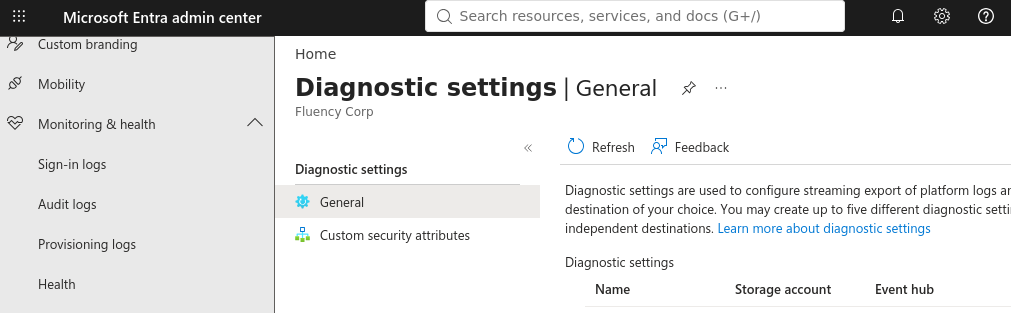
Sign in to the Microsoft Entra admin center and browse to Entra ID → Monitoring & health → Diagnostic settings. The export settings link on the Audit logs and Sign-in logs pages leads to the same place.
-
On the General tab, choose + Add diagnostic setting.
-
Enter a Diagnostic setting name, such as
fluency. It cannot be changed later. -
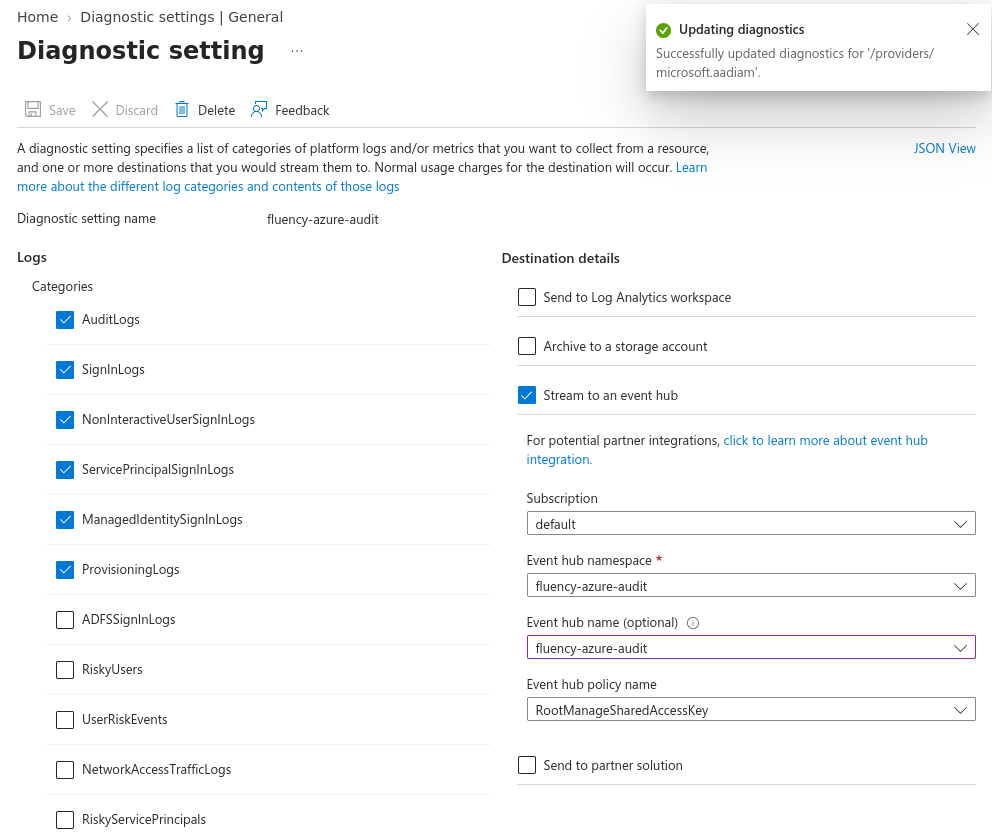
Under Logs → Categories, select the categories to send — at least
AuditLogs, and the four sign-in categories andProvisioningLogsif the tenant has P1 or P2. The template drops anything else; see Where it is filed. -
Under Destination details, tick Stream to an event hub and fill in its fields:
Field Value Subscription The subscription from step 1. Event hub namespace The namespace from step 1. Event hub name (optional) The hub from step 2. Optional to Azure, not to this integration: left empty, Azure creates hubs of its own in the namespace, named insights-logs-…, which the connection string from step 4 does not reach.Event hub policy name RootManageSharedAccessKey, or another namespace-level policy with Manage, Send and Listen — Azure Monitor requires all three to stream. This is Entra's write credential. It is separate from Fluency's Listen-only one and never leaves Azure. -
Choose Save. A Successfully updated diagnostics notice confirms it.
Audit records for custom security attributes are configured under the Custom security attributes tab of Diagnostic settings, and need the Attribute Log Administrator role as well as Security Administrator. Microsoft recommends sending them to a different destination from the directory audit, "so that attribute assignments are not revealed inadvertently."
6. Check that the hub is receiving
Open the event hub's Overview page in the Azure portal and watch the Messages chart. Incoming Messages above zero means Entra is writing.

The first records take a while. Azure Monitor's guidance is that "data should start flowing to your selected destinations within 90 minutes", and Entra's documentation allows that "It might take up to three days for the logs to start appearing in the destination." To have something definite to look for, make a harmless change in Entra — create a group, then delete it — once the setting is saved.
Part 3 — Fluency
Install the Application
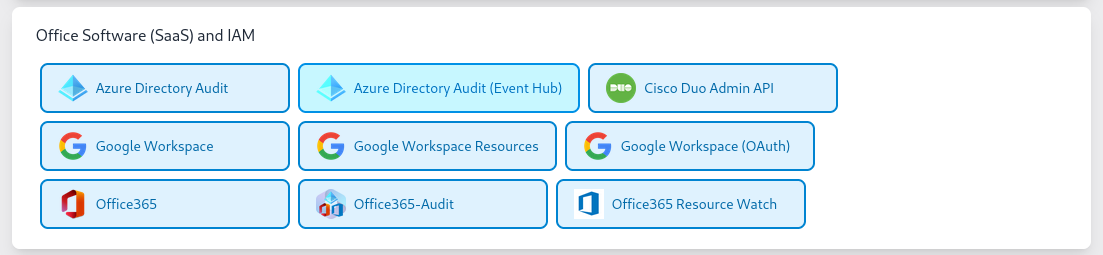
Go to Platform → Applications → Install Application From Template and choose Azure Directory Audit (Event Hub) from the Office Software (SaaS) and IAM category — not the Azure Directory Audit tile beside it, which is the legacy Microsoft Graph template.
| Parameter | Notes |
|---|---|
| Event Hub connection string (Listen policy, including EntityPath) | The Primary connection string from step 4, whole and unedited — Endpoint=sb://…;EntityPath=<hub name>. |
| consumer group this datasource reads with (create a dedicated one if anything else already reads this hub) | Pre-filled $Default. Keep it while Fluency is the hub's only reader; a Basic hub has no other. A name that does not exist on the hub collects nothing. |
| Description | Optional. An editable parameter, distinct from the read-only Description shown in the form's Application section. |
| datalake | Pre-filled managed. |
| datalake index name | Pre-filled MSEntra — the index of as-exported records. Keep it: the Entra ID search facets are set on MSEntra by name. Two applications writing to the same index name in the same lake will collide, and the second one aborts. |
The last two sit in the collapsed Advanced Configurations row below the parameters — expand it to reach them.
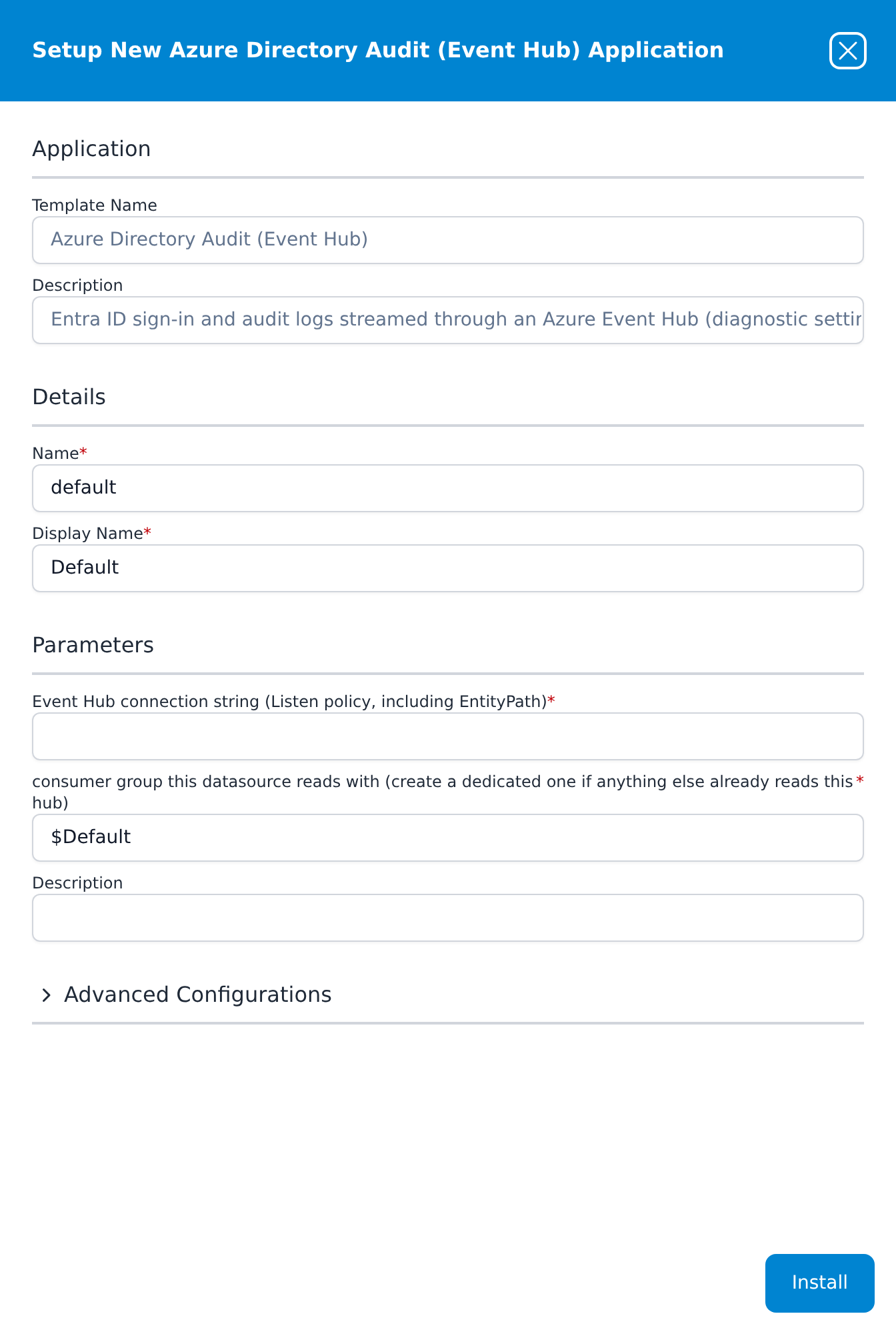
The Event Hub connection string field takes the Primary connection string exactly as you copied it in step 4 — one line, starting with Endpoint=sb:// and ending with ;EntityPath= and the hub's name:
Endpoint=sb://<namespace>.servicebus.windows.net/;SharedAccessKeyName=<policy name>;SharedAccessKey=<key>;EntityPath=<hub name>
Not the Primary key on its own, and not a namespace policy's string, which has no EntityPath. Template parameters are read-only after install, so a wrong value means uninstalling the application and installing it again.
Press Install. The application then appears in the Installed Applications view as Azure Directory Audit (Event Hub): Default, with a Pending badge that turns to Running once the pipeline is up.
Confirm it is running
The application's card draws its pipeline: the event hub data source, the router, the five table indexes listed under Where it is filed, and the management queue that carries the as-exported records into MSEntra.
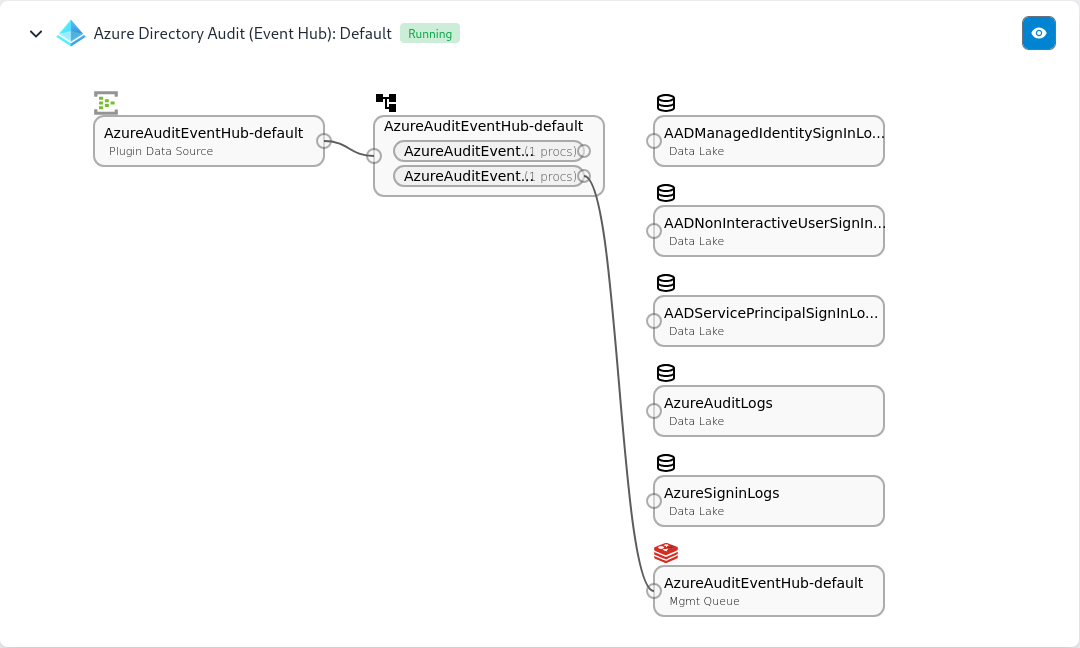
Running reports the pipeline, not the stream. Confirm on both sides:
-
In Azure, on the hub's Overview page, Outgoing Messages starts rising alongside Incoming Messages once Fluency is reading. Between them, the two lines localise most problems:
Incoming Outgoing Meaning Zero Zero Nothing is writing to this hub. Go back to step 5. Rising Zero Entra is writing and nothing is reading. Check the connection string and the application. Rising Rising Fluency is reading. -
In Fluency, search the
MSEntraindex — managed-MSEntra in the Search index selector — for@eventType:AuditLogsand the group you created in step 6. See Confirm data is arriving.
The directory audit only records changes, so a stable tenant can be quiet for hours. A change you made yourself, found in the index minutes later, distinguishes "nothing has happened" from "nothing is arriving". With sign-ins collected, signing in to the Microsoft Entra admin center does the same job.
Maintenance
Rotating the key
Every shared access policy has two keys, which makes an overlap possible: reinstall the application with the policy's Secondary connection string, and once data is flowing again, regenerate the primary key in Azure. Template parameters are read-only after install, so a new value means uninstall and reinstall. Keep the gap shorter than the hub's retention and nothing is lost. Rotating the Key has the full procedure.
Changing what is streamed
Edit the diagnostic setting in Entra ID — Edit setting on its row — to add or remove categories. Nothing changes on the Fluency side, and only records written after the change are affected.
Removing the integration
- Uninstall the application in Fluency, with the red Uninstall button at the foot of its details panel.
- Delete the diagnostic setting in Entra ID → Monitoring & health → Diagnostic settings. Left in place, Entra keeps writing into a hub nobody reads.
- Delete the namespace, or the whole resource group, to stop the hourly charge.
Troubleshooting
| Symptom | Likely cause | Fix |
|---|---|---|
| Incoming Messages stays at zero | The diagnostic setting points at a different hub — usually because Event hub name was left empty and Azure created insights-logs-… hubs of its own | Edit the setting and choose the hub from step 2. The namespace's Event Hubs list shows any hubs Azure created; delete them once nothing writes to them. |
| Incoming Messages stays at zero for a new setting, and it points at the right hub | Too early, or a quiet tenant | Microsoft allows up to three days. Make a change in Entra to give it something to send. |
| Incoming rises, Outgoing stays at zero | Fluency is not reading | Check that the connection string ends in ;EntityPath= and this hub's name, that any consumer group named on the form exists on the hub, and that the application is Running. |
The connection string has no EntityPath | The policy was created on the namespace | Create a Listen-only policy on the event hub — step 3 — and reinstall with its string. |
| The diagnostic setting's namespace list is empty, or Save fails with an authorization error | The person creating it cannot list the namespace's keys, or the subscription belongs to another tenant | Give them Contributor on the namespace, or use a subscription associated with this Entra tenant. |
| Diagnostic settings is read-only, or Add diagnostic setting is unavailable | The signed-in account is not a Security Administrator | Sign in with an account that holds the role. |
AuditLogs arrive, sign-ins never do | The tenant has no Entra ID P1 or P2 licence, or the sign-in categories were not selected | Expected on Free. Otherwise, edit the setting and select them. |
| Risk, Graph activity or other categories are selected and never appear | This template keeps only the sign-in, audit and provisioning categories | Send them with a second diagnostic setting to a hub read by the Azure Event Hubs template. |
| Provisioning records are not in any table index | ProvisioningLogs has no table index | Search MSEntra for @eventType:ProvisioningLogs. Provisioning logs need P1 or P2, and a tenant that provisions nothing has none. |
| Throttled requests on the hub's Overview, and collection falls behind | The namespace has too few throughput units for the volume — usually the non-interactive and service principal sign-ins | Add throughput units, or enable Auto-inflate on a Standard namespace. |
| The namespace's Networking restricts public access | Azure Monitor cannot write and Fluency cannot read | Azure Monitor requires Allow trusted Microsoft services to bypass the firewall; Fluency also has to be able to reach the namespace. |
| A gap after a Fluency-side outage | The outage outlasted the hub's retention | Unrecoverable through the hub. Standard retains up to seven days; Basic one. |
Under the hood
Engineering reference — record shape, the template and the reader
What Azure writes
Azure Monitor and Entra diagnostic settings write JSON batches of the form {"records": [ … ]} to the hub. Each record carries time, category, operationName, resourceId and properties at least; for Entra categories, properties holds the audit or sign-in record itself. Records are written as they are produced and partitioned without a key, so their order across partitions is not guaranteed — sort on time, not on arrival.
The Azure Directory Audit (Event Hub) template
The application reads the hub through an Azure EventHubs plugin data source, AzureAuditEventHub-<name>, which feeds a router of the same name. Two pipes run on the router:
AzureAuditEventHub_Transformrewrites each sign-in and directory audit record into the columns of its Log Analytics table, writes it to that table's index, and passes the original record on. Where Graph's object has no value for a column, the Azure Monitor envelope fills it:AADTenantId,Level,ResultTypeandResultDescription, and for auditsOperationName,OperationVersion,ResultSignature,IdentityandDurationMs.AzureAuditEventHub_Adjustmentsdrops every category but the sign-ins, the directory audit and provisioning, and writes the rest, unchanged, to the form's index through the management queue, also namedAzureAuditEventHub-<name>. It adds only@metadata:@timestampfrom the record's own time (createdDateTimefor sign-ins,activityDateTimefor audit and provisioning, the envelope'stimeotherwise),@eventTypeset to the category,@tenantId,@sender(azureAudit) and@source(AzureEventHub). OnUserManagementaudits it also geolocates the initiating user's IP address, under@normalized.
The form's index is created with the MSEntra schema, listed on Data Lake → Schemas. It is dynamic: each record is held whole as JSON in a doc column, beside timestamp, size and labels. The legacy template's AzureAudit schema has the same layout, but the records in it are Microsoft Graph's, not the Azure Monitor envelope.
Consumer groups and checkpoints
The application reads through the consumer group named on the form. Unlike the Azure Event Hubs template, it has no checkpoint-storage parameter. Another application reading the same hub needs a different consumer group. Event Streams covers both.
References
Microsoft
- Stream Microsoft Entra logs to an event hub — the Entra side, and the roles it needs
- Logs available for streaming from Microsoft Entra ID — every category
- Access activity logs in Microsoft Entra ID — licence requirements by log type
- Create an event hub using the Azure portal
- Get an Event Hubs connection string
- Diagnostic settings in Azure Monitor — the destination rules, the policy rights and the region constraint
Fluency
- Event Streams — retention, consumer groups, checkpoints and key rotation for any event hub
- Azure Event Hubs — every other Azure log, through the generic template
- AzureAD (Entra ID) Audit (Legacy) — the Microsoft Graph template this replaces, and how the two compare
- Install Application From Template — every template and its parameters
- Confirm data is arriving
- Microsoft integrations — the rest of this category