AzureAD (Entra ID) Audit (Legacy)
This page documents the Azure Directory Audit template, which polls the Microsoft Entra ID (formerly Azure AD) directory audit and sign-in logs from Microsoft Graph. It is authorised by administrator consent: an administrator approves a Fluency application, FluencyAzureADAudit, in your tenant, and Fluency reads the logs with that grant.
| Template | How the logs leave Entra ID | What your tenant grants | Guide |
|---|---|---|---|
| Azure Directory Audit (Event Hub) | A diagnostic setting pushes them into an event hub in your Azure subscription | A Listen-only connection string to that one event hub | Entra ID Audit via Event Hubs |
| Azure Directory Audit (this page) | Fluency polls Microsoft Graph | Tenant-wide AuditLog.Read.All and Directory.Read.All to a Fluency application | This page |
If you are connecting Entra ID for the first time, go to Entra ID Audit via Event Hubs. This page is for tenants still running Azure Directory Audit; Compared with the Event Hub route sets the two side by side.
The setup has two halves, in the opposite order to most guides:
- In Fluency — install the Azure Directory Audit template with an administrator's email address. This sends the approval request.
- In Microsoft — that administrator reviews the permissions and accepts.
What arrives
| Stream | Endpoint | Permission | Contents |
|---|---|---|---|
| Directory audit | GET /v1.0/auditLogs/directoryAudits | AuditLog.Read.All | Directory changes: users and groups created or modified, role assignments, application and consent grants, password resets, PIM activity. |
| Sign-ins | GET /v1.0/auditLogs/signIns | AuditLog.Read.All | Interactive sign-ins with client IP, device, application, Conditional Access result and risk state. Requires Entra ID P1 or P2 — see Before you begin. |
Both streams land in three indexes:
| Index | Contents | Named by |
|---|---|---|
AzureAudit | Every record, both streams. | The form's datalake index name |
AzureAuditLogs | The directory audit, in the AzureAuditLogs schema. | The template |
AzureSigninLogs | The sign-ins, in the AzureSigninLogs schema. | The template |
The AzureAuditLogs and AzureSigninLogs indexes are created by the install and are not exposed as parameters — so they cannot be renamed to dodge a collision.
Office365-Audit collects this directory audit and these sign-ins too, from the same Graph endpoints, and its install creates the same AzureAuditLogs and AzureSigninLogs indexes. Both also write the directory audit to an index that defaults to AzureAudit — this template's datalake index name and Office365-Audit's datalake index name for AzureAudit — and two applications writing to the same index name in the same lake will collide, and the second one aborts. Run one or the other, not both.
Retention decides how long an outage can last
| Report | Entra ID Free | Entra ID P1 | Entra ID P2 |
|---|---|---|---|
| Audit logs | Seven days | 30 days | 30 days |
| Sign-ins | Seven days | 30 days | 30 days |
This template reads what Entra still holds, so Entra's retention is how long collection can stop before data is lost for good. Seven days on a Free tenant is the number that catches people: an outage over a long weekend, unnoticed until Tuesday, is close to the limit. Microsoft is explicit that there is no recovery path — "Log retention changes aren't retroactive", and "Data that has already expired can't be recovered unless it was previously archived." Upgrading the licence afterwards does not help either: "When you switch from a free to a premium version, you can only see up to 7 days of data."
Before you begin
A Global Administrator or Privileged Role Administrator to approve the request. Microsoft's rule is:
Privileged Role Administrator, for granting consent for apps requesting any permission, for any API.
Cloud Application Administrator, AI Administrator, or Application Administrator, for granting consent for apps requesting any permission for any API, except Microsoft Graph app roles (application permissions).
This application requests AuditLog.Read.All as a Microsoft Graph application permission, so it falls in the exception: Cloud Application Administrator and Application Administrator are not sufficient.
Microsoft Entra ID P1 or P2, for sign-ins only. The directory audit works on every tier, including Free. Without P1 or P2, the sign-in endpoint returns
Authentication_RequestFromNonPremiumTenantOrB2CTenant:
Neither tenant is B2C or tenant doesn't have premium license
and the rest of the integration is unaffected.
An email address that will get the consent link to the approver. It does not have to be the administrator's own — see the note under Install the Application.
Access to the Fluency portal with permission to install applications.
Part 1 — Fluency
Install the Application
Go to Platform → Applications → Install Application From Template and choose Azure Directory Audit from the Office Software (SaaS) and IAM category.
| Parameter | Notes |
|---|---|
| Enable Admin Consent Mode? | Checkbox, ticked by default. Leave it ticked for the consent route. Unticking it changes the form — see If your tenant will not allow the consent route. |
| admin email address | Where the consent link is sent. Any valid address — see the note below. |
| datalake | Pre-filled managed. |
| datalake index name | Pre-filled AzureAudit. Two applications writing to the same index name in the same lake will collide, and the second one aborts. |
The admin email address can be any valid email address. It is used only to deliver the consent link and plays no part in authentication. Whoever opens the link signs in to Microsoft with the actual administrator account, which can be a different address entirely. The Global Administrator or Privileged Role Administrator requirement applies to the account that signs in, not to the address the link was sent to.
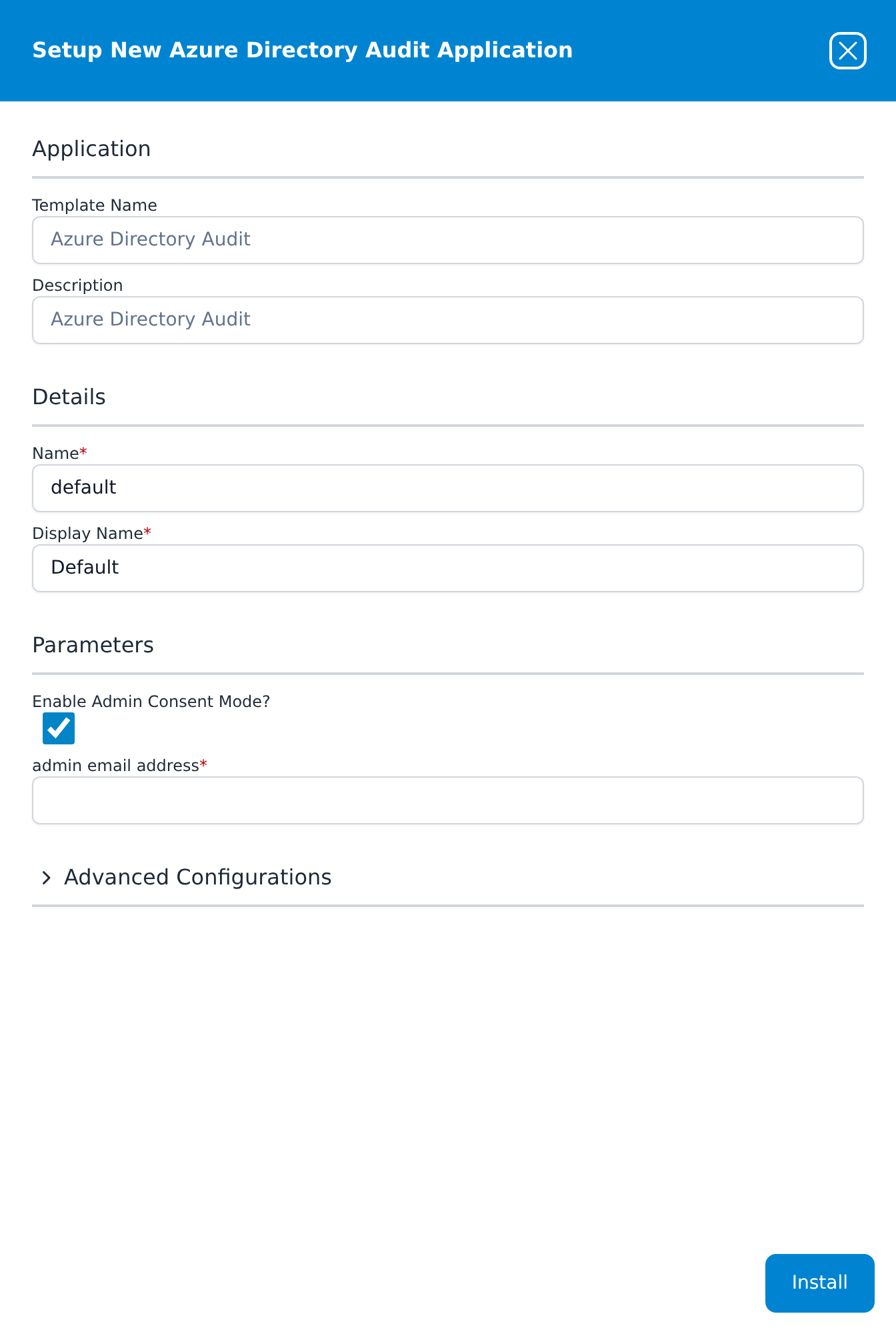
Press Install. The application then appears in the Installed Applications view, where its badge reads Running once the pipeline is up.
The badge reflects the pipeline, not the consent. Until the administrator approves in Microsoft, this application has nothing to read, and it looks identical to one that is collecting normally. The check that answers the question is on the Microsoft side — see Confirm it is running.
If your tenant will not allow the consent route
If your organisation blocks consent to third-party applications, untick Enable Admin Consent Mode — the form replaces the email field with Azure Tenant ID, Azure ClientID and Azure ClientSecret, for an app registration you create and hold yourself. Build it as described in Part 1 of the Office 365 Audit page, granting AuditLog.Read.All and Directory.Read.All as Application permissions on Microsoft Graph.
A tenant that blocks third-party consent is usually better served by Entra ID Audit via Event Hubs, which needs no application in the tenant at all.
Part 2 — Microsoft
This half is performed by the administrator who opens the consent link.
Review the request and accept
Opening the link takes the administrator to login.microsoftonline.com, where they sign in with their administrator account and are shown the permission request. If nothing arrives, check spam quarantine first; reinstalling does not change how the request is delivered.
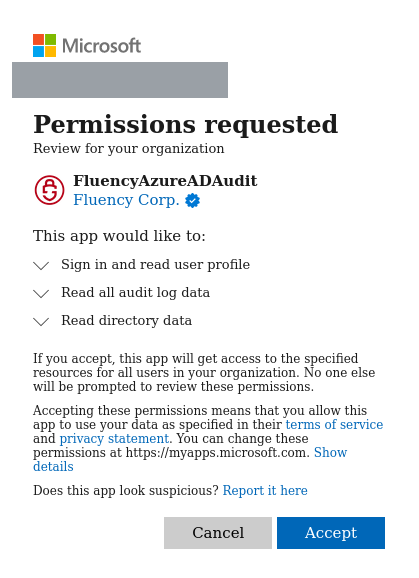
| Consent screen wording | Permission | What it buys |
|---|---|---|
| Sign in and read user profile | User.Read (delegated) | Identifies the signing-in administrator during the consent itself. Not used for collection. |
| Read all audit log data | AuditLog.Read.All | The directory audit and sign-in endpoints. |
| Read directory data | Directory.Read.All | Resolves the object GUIDs in audit records to names, and lets the sign-in endpoint read the tenant's licensing. |
Three checks before accepting:
- The application is
FluencyAzureADAuditand the publisher is Fluency Corp. If either is different, stop. - The list is exactly these three. A consent screen asking for more is not this integration.
- The screen says Review for your organization — that is the tenant-wide grant.
Click Accept. If the administrator clicks Cancel, Microsoft returns AADSTS65004: The resource owner or authorization server denied the request., no grant is created, and nothing on the Fluency side reports it.
Once accepted, the grant lives on the tenant rather than on the administrator who approved it. It does not expire, it survives the approver leaving, and it can be revoked by anyone with the role from Enterprise applications without Fluency being told.
Confirm it is running
In the Microsoft Entra admin center, go to Entra ID → Enterprise apps → All applications and search for FluencyAzureADAudit. If consent was granted, the application is there; if it is not, the request was never accepted.
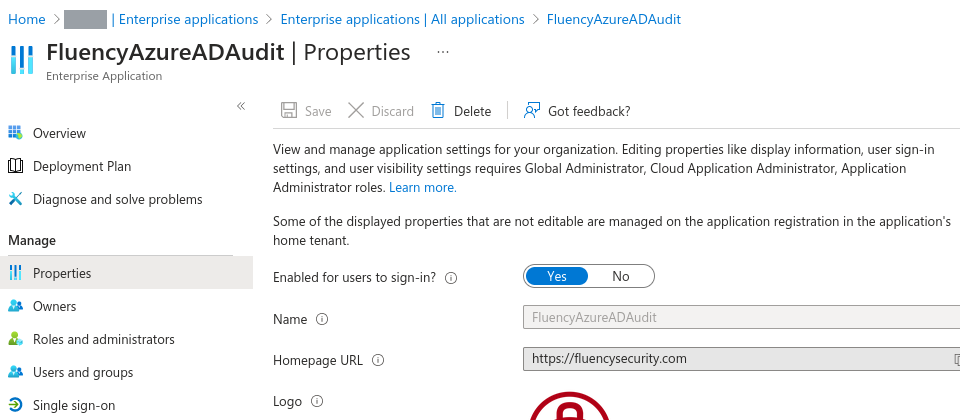
Security → Permissions → Admin consent shows exactly what was granted. Its Type column separates Delegated from Application, which matters because Read directory data is worded identically for both.
Then check that events are landing in the AzureAudit index — see Confirm data is arriving. The directory audit only records changes, so on a quiet tenant make a harmless change in Entra — create a group, then delete it — and search for it a few minutes later.
Compared with the Event Hub route
The Event Hub route collects the same directory audit, plus categories this template cannot reach, without a Graph grant.
| Azure Directory Audit | Azure Directory Audit (Event Hub) | |
|---|---|---|
| Who sets it up | A Global Administrator or Privileged Role Administrator, approving a consent request | Contributor on an Azure subscription, then a Security Administrator for the diagnostic setting |
| What Fluency holds | A tenant-wide Graph grant | A Listen-only connection string to one event hub |
| Entra categories | Directory audit and interactive sign-ins | Non-interactive, service principal and managed identity sign-ins and provisioning as well; not the risk categories |
| How long collection can stop without loss | Entra's retention: seven days on Free, 30 on P1 or P2 | The hub's retention: one day on Basic, up to seven on Standard |
| Azure cost | None | The Event Hubs namespace, billed hourly |
Maintenance
There is no credential to rotate
No secret expires on the consent route. What can break the integration is someone revoking the consent, so the maintenance task is review rather than rotation.
Reviewing and revoking the grant
From Entra ID → Enterprise apps → All applications → FluencyAzureADAudit → Permissions → Admin consent, use the ... control on a permission row and select Revoke permission.
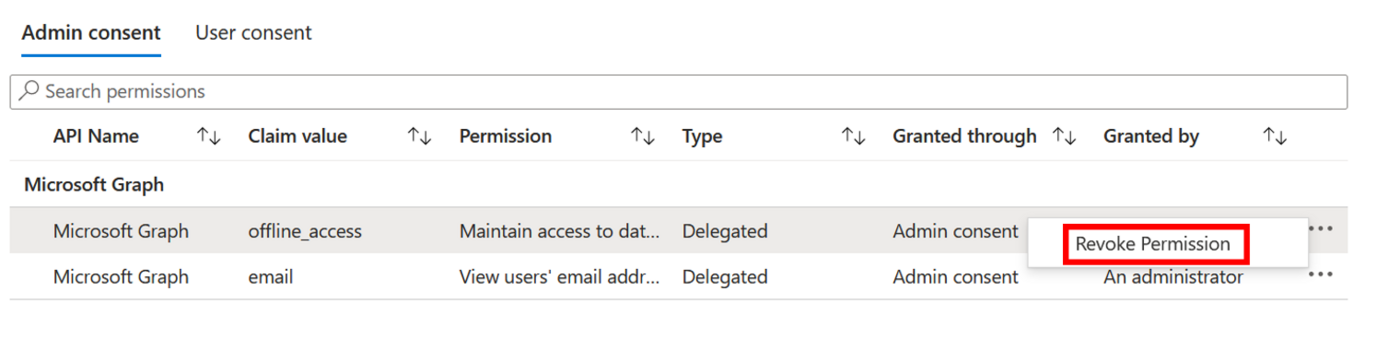
- Nothing tells Fluency. Collection stops and the application keeps reporting Running. On a Free tenant that silence costs a week of data before anyone is likely to notice.
- Revoking does not stop the application being re-consented. Microsoft notes that "Revoking the current granted permission doesn't stop users from re-consenting to the application's requested permissions." To block it permanently, delete the enterprise application or restrict consent at the tenant level.
Removing the integration
Uninstall the application in Fluency first, then delete the enterprise application in Entra ID (Properties → Delete) or revoke its permissions as above.
Troubleshooting
| Symptom | Likely cause | Fix |
|---|---|---|
| The application shows Aborted immediately after install | An index name is already taken — usually AzureAudit from Office365-Audit | The details panel names the index in red. Office365-Audit already collects this feed; keep one of the two. |
| The administrator sees Need admin approval rather than a consent screen | AADSTS90094 — the account cannot consent to Microsoft Graph application permissions | Have a Global Administrator or Privileged Role Administrator open the same link. |
Consent fails with AADSTS65004 | The administrator selected Cancel | Send the request again. No grant was created. |
| The administrator never received anything | Wrong address, or the message was quarantined | Check the address on the install form, then spam quarantine. |
| Running, but the index is empty and has always been empty | Consent was never granted | Search Enterprise applications for FluencyAzureADAudit. If it is absent, the request was not accepted — resend it. |
| Running, consent is granted, index still empty | The tenant may simply be quiet | Make a harmless change in Entra and search for it. |
| Directory audit records arrive, sign-in records never do | The tenant has no Entra ID P1 or P2 licence | Expected on Free. Neither tenant is B2C or tenant doesn't have premium license confirms it. |
Sign-in records arrive but appliedConditionalAccessPolicies is empty | Policy.Read.All is not granted | The consent route does not request it. On the client-secret route, add it to your registration. |
| The premium-licence error appears intermittently rather than always | Directory.Read.All missing or uncached | Microsoft notes that permission is what retrieves tenant licensing information. Confirm both permissions are on the Admin consent tab. |
| Collection worked, then stopped, with no change on the Fluency side | The grant was revoked, or the application was deleted | Check Enterprise applications → Permissions → Admin consent. Re-consent if it is gone. |
| A gap in the data that will not backfill | The events aged out of Entra | Unrecoverable. Seven days on Free, 30 on P1 or P2. |
Under the hood
Engineering reference — the consent flow, the Graph endpoints and the install
How the consent route authenticates
The application Fluency operates is registered as multi-tenant in Fluency's own directory. Approval goes through Microsoft's admin consent endpoint:
https://login.microsoftonline.com/{tenant}/v2.0/adminconsent
        ?client_id={fluency-client-id}
        &scope=https://graph.microsoft.com/.default
        &redirect_uri={fluency-callback}
        &state={opaque}
Approval produces a redirect carrying admin_consent=True and the tenant GUID, which is why the form never asks for a tenant ID. Older versions of this integration did ask for one, on a Cloud Integrations page that no longer exists.
Collection then uses the client credentials grant against https://graph.microsoft.com/.default. Application permissions produce an appRoleAssignment on the service principal, and delegated permissions consented tenant-wide produce an oauth2PermissionGrant with consentType: AllPrincipals. Neither references the approving user's account, which is why the grant outlives them.
The Graph endpoints
Both streams are ordinary Graph collections, polled with a timestamp filter and paginated through @odata.nextLink:
GET https://graph.microsoft.com/v1.0/auditLogs/directoryAudits
GET https://graph.microsoft.com/v1.0/auditLogs/signIns
directoryAudits filters on activityDateTime; signIns filters on createdDateTime. appliedConditionalAccessPolicies is populated on sign-in records only when the caller also holds Policy.Read.All, which this application does not request.
What the install creates
Two pipes run on the application's router. The first, AzureAudit_Transform, rewrites each sign-in into the AzureSigninLogs schema and each directory audit record into the AzureAuditLogs schema, writes it to the index of the same name, and passes the original record on. The second, AzureAudit_Adjustments, writes every record to the index named on the form. The application's Actions list records one line per object created; addDatalakeIndex entries create the indexes in the managed lake as a side effect of the install, which is why a name that already exists aborts the whole application.
References
Microsoft
- Microsoft Entra audit logs API overview — the endpoints and their shapes
- List directoryAudits and List signIns
- Microsoft Entra data retention — seven days on Free, 30 on P1/P2
- Grant tenant-wide admin consent — which roles can approve
- Review permissions granted to enterprise applications — reviewing and revoking
- Admin consent on the Microsoft identity platform — the endpoint and its error responses
Fluency
- Entra ID Audit via Event Hubs — the current route for Entra ID logs
- Office 365 Audit — this feed plus the unified audit log and the directory resources, on a client secret
- Install Application From Template — every template and its parameters
- Confirm data is arriving
- Microsoft integrations — the rest of this category