Auth0
Auth0's tenant logs record every login and signup to the applications a tenant serves, each multi-factor prompt and its outcome, password changes and breached-password detections, the blocks raised by Auth0's attack protection, and every change an administrator or a script makes through the Dashboard or the Management API. Fluency polls the tenant's GET /api/v2/logs endpoint every five minutes and writes the events into a datalake index.
Authentication is a Machine to Machine application in your tenant, authorized for the Auth0 Management API with the single permission read:logs; the collector trades its Client ID and Client Secret for a short-lived access token. Auth0 is Okta's customer-identity platform and not the Okta org your employees sign in to: if your administrators sign in at manage.auth0.com and the tenant domain ends in auth0.com, this is the right page; an Okta org (*.okta.com) is collected by Okta.
The setup has two halves:
- In Auth0: signed in to the Dashboard with the Admin role, create a Machine to Machine application under Applications → Applications, authorize it for the Auth0 Management API with
read:logsonly, and copy its Domain, Client ID and Client Secret from its Settings tab. - In Fluency: install the Auth0 application template and paste those three values in.
What arrives
| Stream | What it holds | Lands in |
|---|---|---|
| Tenant logs | Every event in the tenant's log: successful and failed logins and signups, MFA prompts and results, password and email changes, breached-password detections, attack-protection blocks, token exchanges, and Dashboard and Management API changes, each with the user, application, connection, IP address and location it concerns. | The Auth0 index |
The logs API is on every Auth0 plan, Free included, but the plan decides how long Auth0 keeps the log, between 1 and 30 days: an outage longer than your tenant's retention loses events for good, and the first collection reaches back 24 hours (retention).
Record layout, event codes and ordering are in Reference.
Before you begin
Sign in to the Auth0 Dashboard with the Admin role. Creating an application and authorizing it for the Management API takes that role, and the narrower ones cannot do it: Editor - Specific Apps, for example, is "Update-only access for specific applications. Users cannot create new applications."
Development, staging and production are separate Auth0 tenants, each with its own log and its own applications. Each needs its own Machine to Machine application and its own installation in Fluency, with its own index name (Install the Application).
Part 1: Auth0
1. Create a Machine to Machine application
In the Auth0 Dashboard, go to Applications → Applications and click Create Application.
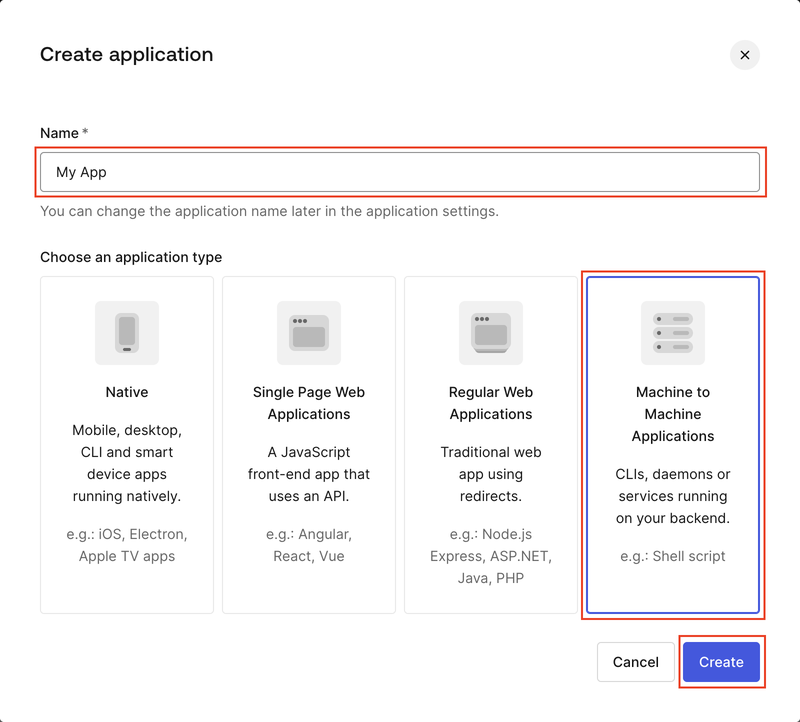
- In Name, enter a name that identifies the consumer, such as
Fluency log collector. Auth0 writes it asclient_nameon every event this application causes, including the collector's own token requests, which is how you will recognise it in Confirm it is running. - Under Choose an application type, select Machine to Machine Applications. An application of another type either cannot use the Client Credentials grant the collector authenticates with (its token request is refused with
unauthorized_client) or is not authorized for the Management API. - Click Create.
A tenant often already has a Machine to Machine application authorized for the Management API, typically one created from its API Explorer tab. Auth0 says that one "has been granted all the Management API scopes": its secret can create users, change connections and grant itself more. Create a dedicated application (why).
2. Authorize it for the Management API with read:logs
Clicking Create opens Authorize Machine to Machine Application.
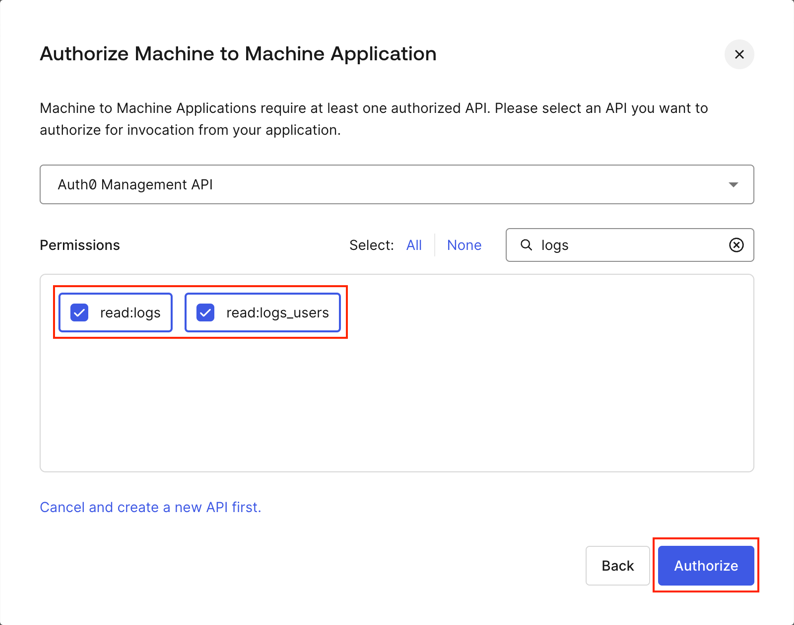
- In the API list, select Auth0 Management API. The list shows it with its identifier,
https://<your Auth0 domain>/api/v2/. - Type
logsinto the Permissions search box and tick read:logs. - Click Authorize.
read:logs is the only permission the collector uses, and it is read-only. The search also shows read:logs_users, which the logs endpoint accepts as well: ticked alongside, as in the capture, it does no harm and adds nothing. Do not click Select: All: it grants every Management API permission, including the two that let the client grant itself more (permissions).
If the dialog was closed before Authorize, or an existing installation reports insufficient_scope, fix the grant in place: go to Applications → APIs → Auth0 Management API, open the Machine To Machine Applications tab, switch on the toggle beside the application, expand its row, tick read:logs and click Update. The Client ID and Client Secret do not change, and a running installation picks the change up the next time the collector obtains a token, because a token keeps the permissions it was issued with for its 24-hour lifetime.
3. Copy the Domain, Client ID and Client Secret
Open the application's Settings tab.
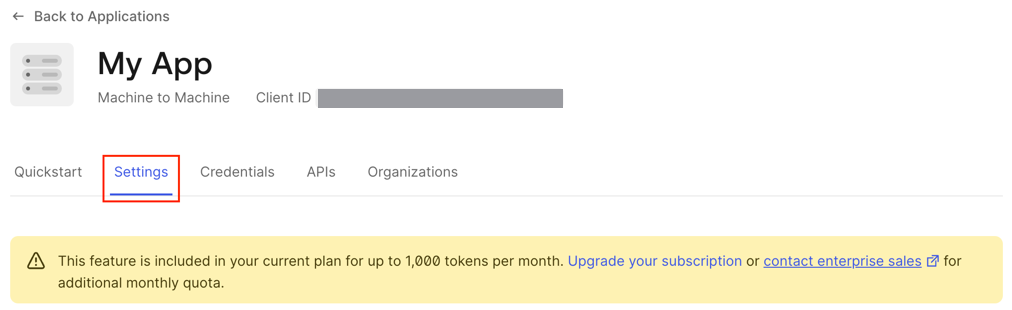
The banner about "up to 1,000 tokens per month" is the tenant's machine-to-machine token quota, and the collector does not draw on it (authentication).
The three values are under Basic Information:
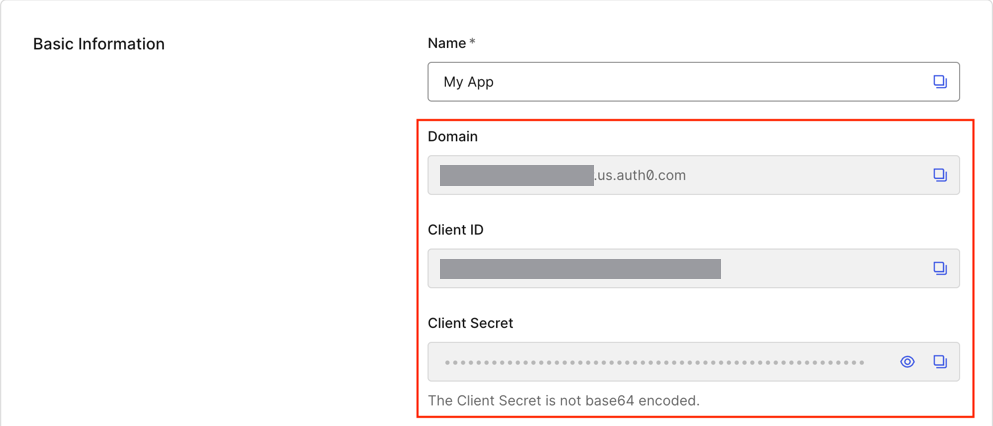
| Value | Where it goes in Fluency |
|---|---|
| Domain | The tenant domain field: <tenant>.<region>.auth0.com, such as acme.us.auth0.com (US tenants created before regional domains are acme.auth0.com). |
| Client ID | The Client ID field. |
| Client Secret | The Client Secret field. The eye icon reveals it and the copy icon copies it. |
The secret stays readable here for as long as the application exists, so there is no one-time copy to miss. Treat it as a password all the same: it is the only thing needed to read the tenant's whole log, user names, email addresses and IP addresses included. Leave the Authentication Method on the application's Credentials tab on Client Secret (Post): the collector sends the secret in the body of its token request, and Private Key JWT has no secret for it to send.
If your users sign in at a custom domain such as login.example.com, the Domain field still shows the tenant's Auth0 domain: copy that. Auth0 recognises the Management API only on its own domain, so a custom domain is refused on the first token request with 403 access_denied and Service not found (why).
Optional: verify the credentials before you leave Auth0
Two calls, run from anywhere with internet access: the first exercises the domain, the credentials and the Management API grant; the second, the permission.
DOMAIN="acme.us.auth0.com"     # step 3: the Auth0 domain, no https://
CLIENT_ID="…"                  # step 3
CLIENT_SECRET="…"              # step 3

# 1. A token for the Management API
curl -sS --request POST "https://$DOMAIN/oauth/token" \
  --data-urlencode grant_type=client_credentials \
  --data-urlencode client_id="$CLIENT_ID" \
  --data-urlencode client_secret="$CLIENT_SECRET" \
  --data-urlencode audience="https://$DOMAIN/api/v2/"
A good answer looks like this, and its scope lists every permission the application holds:
{"access_token":"eyJ…","scope":"read:logs","expires_in":86400,"token_type":"Bearer"}
read:logs (or read:logs read:logs_users) is what you want. Anything more is a grant to trim in step 2.
# 2. One log event with that token
TOKEN="eyJ…"                   # access_token from call 1
curl -sS -o /dev/null -w '%{http_code}\n' \
  -H "Authorization: Bearer $TOKEN" \
  "https://$DOMAIN/api/v2/logs?per_page=1"
| Response | What it means |
|---|---|
200 from call 2 | Domain, credentials, grant and permission are all good. |
404 · Unknown host: <domain> | No tenant at that domain: a typo, or the wrong region (.eu. for .us.). Every name under auth0.com resolves, so a wrong domain reaches Auth0 rather than failing to connect. Recopy the Domain (step 3). |
401 · {"error":"access_denied","error_description":"Unauthorized"} | Wrong Client ID or Client Secret. Auth0 checks these first, so this answer hides every error below it until it is fixed. |
403 · access_denied · Service not found: https://…/api/v2/ | A custom domain: use the Auth0 domain (step 3). |
403 · access_denied · Client is not authorized to access "https://…/api/v2/" | Not authorized for the Management API (step 2). |
403 · unauthorized_client · Grant type 'client_credentials' not allowed for the client. | Not a Machine to Machine application (step 1). |
403 from call 2 · insufficient_scope · Insufficient scope, expected any of: read:logs,read:logs_users | Authorized without read:logs: add it (step 2) and request a new token. |
429 | The tenant's Management API rate limit is spent, usually by other automation. Wait a minute and retry (rate limits). |
Part 2: Fluency
Install the Application
- v2 interface
- Classic v1 interface
In the navigation rail, open Applications and click Install Application, then choose Auth0 from the Cloud-based Business Softwares category of the Application Catalog.
Go to Platform → Applications → Install Application From Template and choose Auth0 from the Cloud-based Business Softwares category.
The three parameters are required and open empty. Their labels are long; each is named in full below.
| Parameter | Notes |
|---|---|
| Auth0 tenant domain, e.g. acme.us.auth0.com (the canonical *.auth0.com domain, not a custom login domain) | The Domain from step 3. A leading https:// and anything after the host are ignored. |
| Client ID of a Machine to Machine application authorized for the Auth0 Management API with the read:logs scope | The Client ID from step 3. |
| Client Secret of that Machine to Machine application | The Client Secret from step 3. Masked as you type. |
| datalake | Pre-filled managed. |
| datalake index name | Pre-filled Auth0. Two applications writing to the same index name in the same lake will collide, and the second one aborts. For a second Auth0 tenant, give its installation its own Instance name and its own index name, such as Auth0Prod. |
The collector takes every event type the tenant logs; nothing on the form selects among them.
- v2 interface
- Classic v1 interface
datalake and datalake index name sit in the collapsed Advanced configuration section below Configuration; click its heading to reach them.
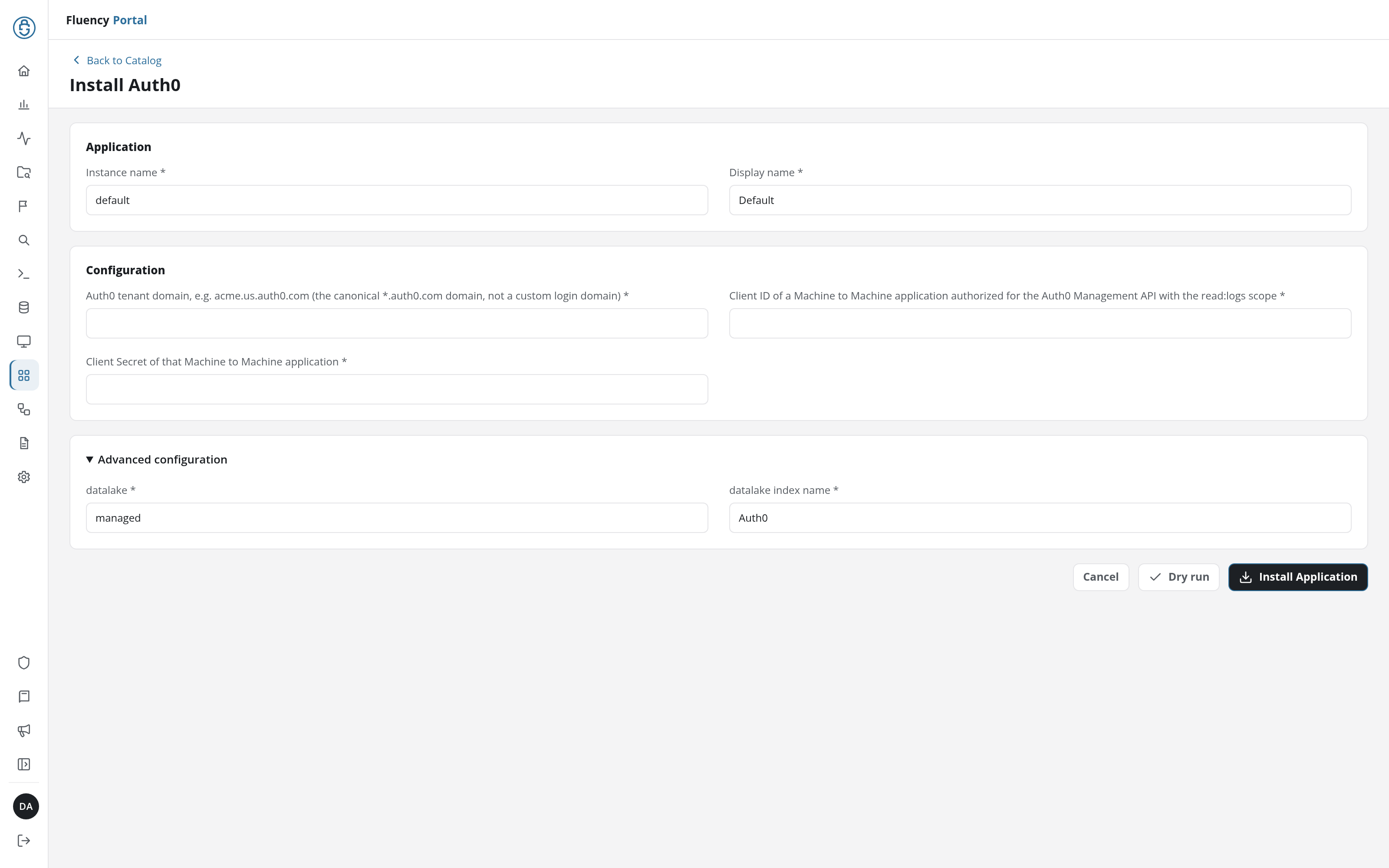
Leave Instance name and Display name at default / Default unless you are installing a second instance for another tenant, in which case give each one a name you will recognise on the applications list.
Click Dry run first to have the platform check the values before anything is installed, then click Install Application. The Applications page opens with the notice Default is launching., and the new application is listed with a green Running badge once the pipeline is up.
datalake and datalake index name sit in the collapsed Advanced Configurations row below the parameters; expand it to reach them.
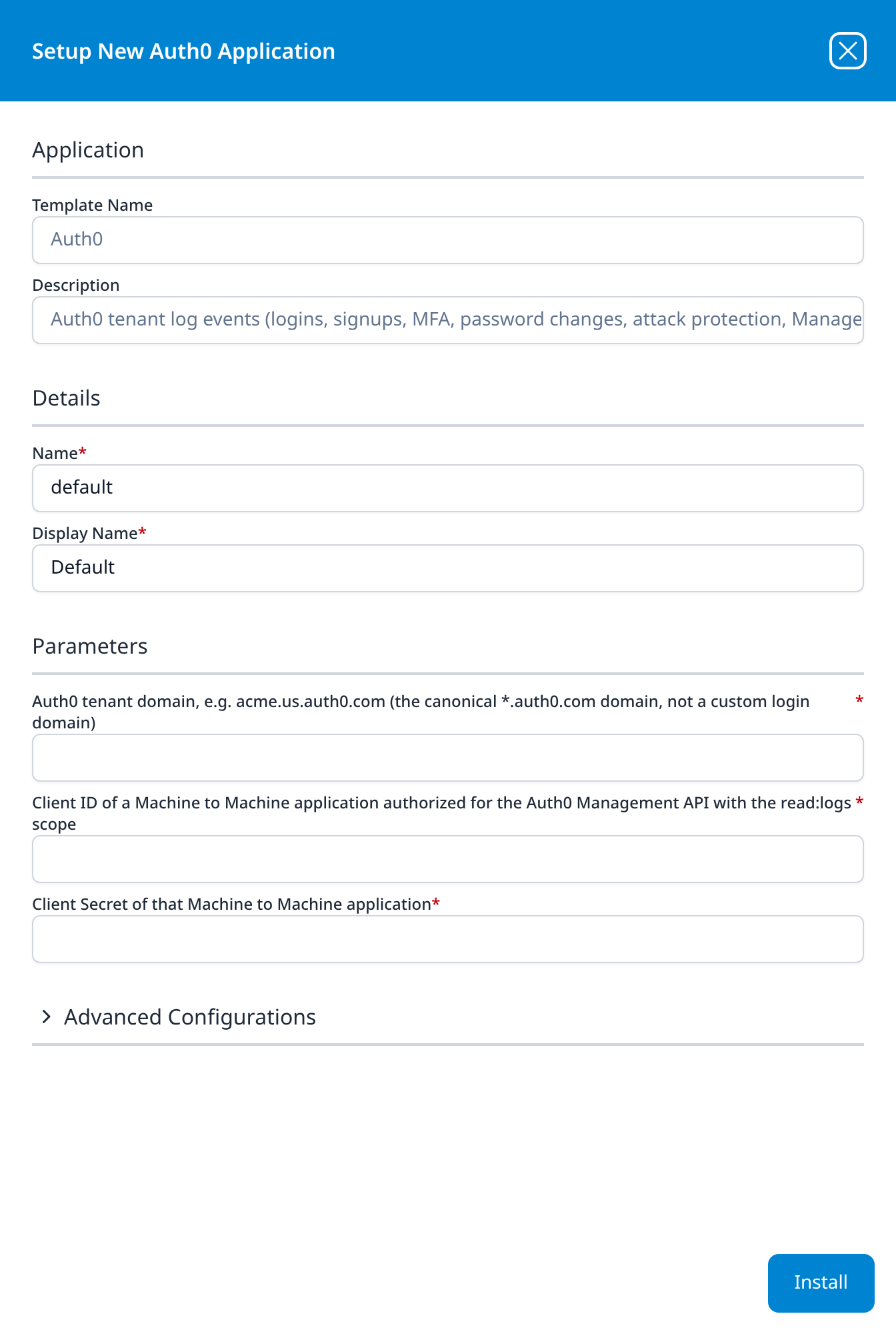
Leave Name and Display Name at default / Default unless you are installing a second instance for another tenant, in which case give each one a name you will recognise on the applications list.
Press Install. The application then appears in the Installed Applications view, where its badge reads Running once the pipeline is up.
Confirm it is running
A Running badge means the pipeline started, not that Auth0 accepted the credentials. Auth0 logs the collector's own token requests, so the check below works even on a quiet tenant.
- v2 interface
- Classic v1 interface
- The application is up. On Applications, Auth0 is listed with
Defaultbeneath it and a green Running badge. Click its row to open the application details: the Pipeline card draws the Auth0 data source feeding a router and the destination it writes to, and the Actions list recordsaddDatalakeIndexmanaged-Auth0. A red Error badge means the pipeline aborted or reported errors in the last hour, and the details page shows the error message beneath the summary figures.
- The application is up. The card in Installed Applications reads
Auth0: Defaultwith a Running badge. Aborted in red means the pipeline stopped on an error, and the details panel carries the message.
- Find the collector in Auth0's own log. Each time the collector obtains a token, Auth0 logs a
seccftevent, "Successful Exchange of Access Token for a Client Credentials Grant", naming the application. In the Auth0 Dashboard, open Monitoring → Logs and look for events from the application you created in step 1. Afeccftfrom it instead ("Failed exchange of Access Token for a Client Credentials Grant") means Auth0 refused the credentials, and the event's description says why. - Find the same events in Fluency. Allow ten minutes, then query the
Auth0index for records whose@auth0.typeisseccftand whose@auth0.client_nameis the application's name. The first collection reaches back 24 hours, so the token requests from the verification calls and thesapievents Auth0 logged while you created the application are already among them.
If the collector's seccft events are in Auth0's log and not in Fluency after fifteen minutes, look for an Auth0 Poll Error notification; its text names the failing call and the likely cause (Troubleshooting). Confirm data is arriving has the platform-side checks: application health, ingress volume and storage-side queueing.
Once the application reads Running and the collector's seccft events are in the Auth0 index, setup is complete.
Maintenance
The clock to watch is Auth0's retention. The collector keeps a checkpoint (the log_id of the last event it collected) and catches up from it after an outage on either side, but only as far back as Auth0 still holds, and Auth0 does not say when it has deleted events past the checkpoint: it carries on from the oldest event it still has. The collector checks for that whenever it has not reached the end of the log for more than 23 hours, and sends an Auth0 Warning naming the period whose events may have been deleted. It also sends one when a poll ends more than an hour behind real time, which means it is falling behind the tenant's volume.
Rotating the Client Secret
Template parameters are read-only after install, so a new secret means a new application. Rotating in Auth0 retires the old secret almost at once ("New secrets may be delayed up to thirty seconds while rotating"), so do both steps together:
- In Auth0, open the application, scroll to the Danger Zone at the foot of its Settings tab, click Rotate and confirm. Copy the new Client Secret; the eye icon beside it on the Credentials tab reveals it.
- In Fluency, uninstall the Auth0 application and install it again with the same domain and Client ID and the new secret. To uninstall, click Uninstall at the top right of the application's details page (v1: the red Uninstall button at the foot of its details panel on Platform → Applications).
A fresh installation's first poll reaches back 24 hours, so a gap of less than a day is filled automatically, and events the previous installation already collected in those 24 hours arrive a second time; deduplicate on @auth0.log_id.
Removing the integration
- Uninstall the Auth0 application in Fluency, so nothing is polling: the Uninstall button at the top right of its details page (v1: the red Uninstall button at the foot of its details panel on Platform → Applications).
- In Auth0, delete the application from the Danger Zone at the foot of its Settings tab. That retires its Client Secret; a token already issued stays valid until it expires, because, as Auth0 puts it, "Once issued, an access token cannot be revoked."
Troubleshooting
Collection errors arrive as Auth0 Poll Error or Auth0 Init Error notifications, sent when an error first appears or changes and again once a day while it persists. Each one quotes Auth0's response and adds a hint. The Auth0 side of the same failure is a feccft event in Monitoring → Logs.
| Symptom | Likely cause | Fix |
|---|---|---|
token request: HTTP 404, Unknown host | The domain names no tenant: a typo or the wrong region | Reinstall with the Domain from step 3. |
token request: HTTP 401 access_denied: Unauthorized | Wrong Client ID or Client Secret, or the secret was rotated in Auth0 | Reinstall with the current values. |
token request: HTTP 403 access_denied: Service not found | A custom domain was entered | Reinstall with the Auth0 domain (step 3). |
token request: HTTP 403 access_denied: Client is not authorized to access … | The application is not authorized for the Management API, or its grant was removed | Authorize it again (step 2); no reinstall. Collection resumes at the next attempt, which after repeated failures can be up to an hour away. |
token request: HTTP 403 unauthorized_client | Not a Machine to Machine application | Create one (step 1) and reinstall with its values. |
GET /api/v2/logs: HTTP 403 insufficient_scope | The grant lacks read:logs | Add it (step 2); no reinstall. It takes effect when the collector next obtains a token, within 24 hours. |
| Running, no error, and no events | Not a quiet tenant: Auth0 logs every token exchange, the collector's own included, so a working installation always has something to collect | Look for the application's seccft or feccft events in Monitoring → Logs (Confirm it is running); none at all means the collector is not reaching the tenant. |
| An Auth0 Warning that events may have been deleted by Auth0 before they were collected | Collection stopped for longer than the tenant's retention | Not recoverable from Auth0; the warning names the period, and collection continues from the oldest event Auth0 still holds (retention). |
| An Auth0 Warning that collection is more than 1h0m0s behind real time | The tenant logs faster than its Management API rate limit lets the collector read, often because other automation shares the limit | Collection continues; on plans with short retention, falling further behind loses events (rate limits). |
| Events out of chronological order | Expected: Auth0 orders the log by log_id, the time it received an event, not by date | Sort on @auth0.date (or @timestamp), not on arrival order (ordering). |
| The same event twice | The overlap after a reinstall | Deduplicate on @auth0.log_id (rotation). |
Large numbers of seccft and sertft events | Expected: Auth0 logs every machine-to-machine and refresh-token exchange in the tenant | Filter them out in searches and rules; the form has no setting that drops them. |
Reference
What the tenant log looks like once it lands and how the collector reads it, for searches and detection rules written against the Auth0 index, and the reasoning behind the permission and domain choices in Part 1.
Stream, endpoint and permission
| Stream | Endpoint | Permission | Contents |
|---|---|---|---|
| Tenant logs | GET https://<domain>/api/v2/logs, read by checkpoint | read:logs (read:logs_users is also accepted) | Every event type Auth0 logs for the tenant. |
Permissions and the dedicated application
Why not reuse an application. An application created from the Management API's API Explorer tab is one Auth0 says "has been granted all the Management API scopes": its Client Secret can create users, change connections and, through create:client_grants, grant itself more. Auth0's own advice is to keep consumers apart:
If you have multiple applications that should access the Management API, then you should create separate machine-to-machine applications for each application in Auth0 instead of just a single machine-to-machine application.
A dedicated application also means that rotating its secret disturbs nothing else.
Why not Select: All. It grants every Management API permission, including the two Auth0 warns about:
Use the
update:client_grantsandcreate:client_grantsscopes with only high-privileged applications, as they allow the client to grant further permissions to itself.
read:logs_users is the per-user view of the same log. The logs endpoint accepts either permission; read:logs is the one the collector needs.
Authentication, the token quota and custom domains
Token request. POST https://<domain>/oauth/token with grant_type=client_credentials, the Client ID and Client Secret in the form body (Auth0's Client Secret (Post) method), and audience=https://<domain>/api/v2/. The token lasts 86,400 seconds (24 hours) by default and is reused until it expires; it is never written to disk. A 401 from the logs endpoint (a key rotation, for example) makes the collector request a new token once before failing.
Token quota. Management API tokens do not count toward the tenant's machine-to-machine token quota, the "up to 1,000 tokens per month" on the application's Settings tab. In Auth0's words, "Tokens issued for internal Auth0 audiences do not count toward your quota", and the Management API is an internal audience.
Custom domains. The audience https://<domain>/api/v2/ is recognised only on the tenant's Auth0 domain: "Continue to use your default tenant domain name (such as https://{yourDomain}/userinfo and https://{yourDomain}/api/v2/) instead of your custom domain when specifying an audience."
Retention by plan
"Your Auth0 log retention period depends on your subscription level."
| Plan | Retention |
|---|---|
| Free (Starter) | 1 day |
| Essentials (B2C or B2B) | 5 days |
| Professional (B2C or B2B) | 10 days |
| Enterprise | 30 days |
Past that, the events are gone from Auth0, and nothing reaches further back. Two consequences follow. An outage longer than your plan's retention loses the events in between permanently, and on the Free plan that is anything over a day. And the lake is where Auth0 history longer than a month has to live, which is an argument for installing this before you need it: the first collection reaches back 24 hours and no further.
Sample record and the fields that matter in a detection
A failed password, as the collector forwards it (trimmed; identifiers replaced). Auth0's event is kept unchanged under @auth0, and @timestamp is its date:
{
  "@auth0": {
    "log_id": "90020261111152233019003000000000000001223372061512345678",
    "date": "2026-11-11T15:22:32.927Z",
    "type": "fp",
    "description": "Wrong email or password.",
    "connection": "Username-Password-Authentication",
    "connection_id": "con_XXXXXXXXXXXXXXXX",
    "client_id": "XXXXXXXXXXXXXXXXXXXXXXXXXXXXXXXX",
    "client_name": "Customer Portal",
    "ip": "203.0.113.7",
    "user_agent": "Chrome 141.0.0 / Windows 10.0.0",
    "user_id": "auth0|65f0c0ffee0000000000abcd",
    "user_name": "jane@example.com",
    "strategy": "auth0",
    "strategy_type": "database",
    "hostname": "login.example.com",
    "isMobile": false,
    "location_info": { "country_code": "US", "city_name": "Boston" },
    "details": { "error": { "message": "Wrong email or password." } }
  },
  "@event_type": "auth0",
  "@eventType": "Auth0Log",
  "@timestamp": 1794410552927
}
The fields that carry the weight in a detection:
log_idis unique per event: the deduplication key. It begins with the time Auth0 received the event, so it sorts in arrival order.dateis when the event happened, and the field to sort on.typeis Auth0's event code (event codes) anddescriptionits human-readable text.user_idanduser_namename the user,client_namethe application,connectionthe identity source, andip,user_agentandlocation_infowhere the request came from. Names are inline, so events are readable without a second lookup.detailsholds data specific to the event type. On asapievent it holds the Management API request (method, path and body) and who made it.
Which fields are present depends on the event type.
Event codes worth knowing
Auth0 adds codes over time, and its event type reference lists them all. The prefixes follow a pattern: s… success, f… failure, se… / fe… a successful or failed token exchange, gd_… multi-factor (Guardian), limit_… a block. The ones a security team usually starts with:
| Group | Codes |
|---|---|
| Failed authentication | f, fp (wrong password), fu (unknown user), fs (failed signup) |
| Attack protection | limit_wc (an IP blocked after too many failed logins to one account), limit_sul (logins per IP), limit_mu (an IP blocked for too many failed logins or signups), pla (bot detection, before login) |
| Breached passwords | pwd_leak, signup_pwd_leak, reset_pwd_leak |
| Multi-factor | gd_auth_failed, gd_auth_rejected (a push rejected by the user), gd_enrollment_complete, gd_unenroll, mfar (MFA prompted) |
| Token abuse | ferrt (a rotating refresh token reused), feccft (failed client-credentials exchange) |
| Account changes | scp (password changed), sce (email changed), sdu and du (user deleted) |
| Administration | sapi (a Dashboard or Management API change), fapi (a failed one), mgmt_api_read (a Management API read that returned secrets) |
| Platform | api_limit, api_limit_warning (rate limits reached or close) |
Ordering and duplicates
The collector reads the log the way Auth0 recommends for export, by checkpoint, and Auth0 returns each event once, in log_id order: "The logs are ordered by the log_id, rather than log generation time." An event Auth0 receives late therefore arrives after events dated later than it. Sort on date, never on arrival order. Duplicates occur only when an installation is replaced (Rotating the Client Secret); log_id removes them.
What does not arrive
- Users, applications and connections as records. The template collects the log only. The events name all three inline, so none is needed to read them.
- Tenant configuration (attack-protection settings, MFA factors, the application list). Changes to it arrive as
sapievents; its current state does not.
Collection behaviour and output format
- Cadence. Every five minutes. A poll pages for at most four minutes; anything left is collected by the next poll.
- Checkpoint paging. Each poll asks for the events after the checkpoint (
from=<log_id>&take=100), then follows theLink: rel="next"header page by page, as Auth0 asks, until a short page shows it has reached the end of the log. Search mode (q) is never used: it reaches only the first 1,000 results and lags behind the log. - First run. With no checkpoint, collection starts 24 hours back, from a synthetic
log_id(900followed by the UTC time). - Progress. Events are written in files of up to 10,000, and the checkpoint advances with each file, so a failure part-way keeps what was already collected.
- Retention gaps. When no poll has reached the end of the log for more than 23 hours, the poll first asks Auth0 for the oldest event it still holds. If that event is past the checkpoint, events in between have been deleted, and an Auth0 Warning names the period.
- Failures. Network errors,
429and5xxare retried with backoff. A poll that fails without collecting anything delays the next attempt by 5, 10, 20, 40 and then 60 minutes; one that collected something first keeps the normal cadence.
Output format. Gzipped JSON lines, one event per line, with sourcetype and import source auth0. Each line carries the raw Auth0 event unchanged under @auth0, plus @event_type: auth0, @eventType: Auth0Log and @timestamp (the event's date, in epoch milliseconds). Codes Auth0 introduces later arrive as-is, with their type and description, and need no collector change.
Why polling, not Log Streams. Auth0 can also push its log to an HTTPS endpoint (a Log Stream). The template polls instead because polling works on every plan, Free included, needs only the three values above, and needs no endpoint reachable from Auth0. An existing Log Stream to another product is independent of this integration and keeps working.
Rate limits
The Management API rate limit is per tenant and shared with everything else that calls it, the customer's own automation included. The collector pauses when x-ratelimit-remaining reaches 0 and, on 429, waits until x-ratelimit-reset.
| Plan | Limit on reading logs |
|---|---|
| Free | 2 requests per second, for the whole Management API |
| Essentials, Professional | 100 requests per minute (burst 10) for GET /api/v2/logs: about 10,000 events a minute |
| Enterprise, production tenant | 16 requests per second (burst 50) |
Reaching the limit writes api_limit and api_limit_warning events into the tenant log, which the collector then collects.
Related
Auth0 documentation
- Register Machine-to-Machine Applications: creating the application and authorizing an API
- API Settings: the Machine To Machine Applications tab where an existing application's grant is edited
- Management API Access Tokens: audience, token lifetime and the token quota
- Configure Features to Use Custom Domains: why the audience stays on the Auth0 domain
- Retrieve Log Events Using the Management API: checkpoint and search retrieval, ordering, the
Linkheader - Get log entries: the endpoint reference
- Log Data Retention: retention by plan
- Tenant Log Event Type Reference: every event code and its fields
- Rotate Client Secrets: the Danger Zone procedure
- Feature Access by Role: which Dashboard roles can create applications
- Rate Limit Configurations: Management API limits by plan
Fluency
Other integrations
- Business Software integrations: the rest of this category
- Integration Matrix: which ingress method each product uses
- Okta: the Okta System Log, for the workforce Okta org